
How to Reset a Password
If an attendee or Exhibitor can't log in or hasn't received their reset email, here are the options you can walk them through and how you can step in directly if needed.
What to tell attendees
Direct the attendee to the event Signin PopUp and ask them to follow these steps:
-
Go to
https://[event-url]/ -
Click on sign in button
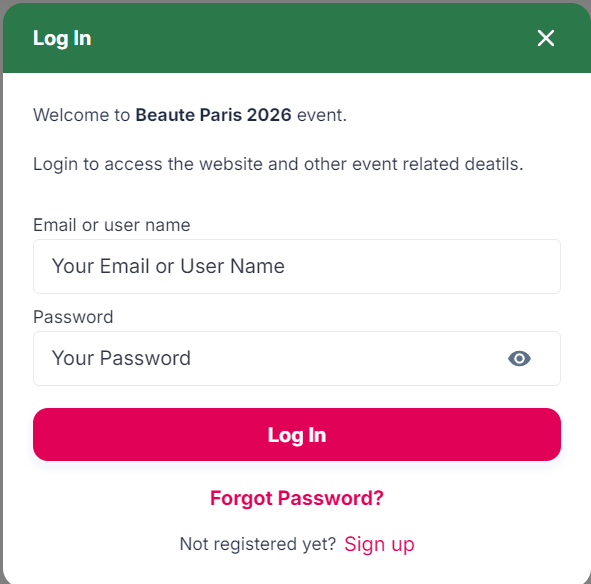
-
Click on the "Forgot your password?" below the login form.
-
Enter their registered email address and submit.
-
Check inbox (and spam folder) for the reset email — it's unique usage and valid for 24 hours.
What to tell Exhibitors
Direct the EXHIBITORS to the event Signin PopUp and ask them to follow these steps:
-
Go to
https://[event-url]/ -
Click on sign in button
-
Click on the "Forgot your password?" below the login form.
-
Enter their USERNAME and submit.
-
Check inbox (and spam folder) of registered email or registered contact — it's unique usage and valid for 24 hours.
VIDEO JOURNEY
Troubleshooting - When a user says “I can’t reset my password”
Clicked the link twice
Links are single-use. A second click always fails — this is expected behaviour.
Opened in a different browser
Copying the link to a new browser after already opening it will cause an error.
Link expired
Links expire after 24 hours. Anything older than that needs a fresh request.
Wrong email address or username
User is using a email address that it’s not registered on the system.
Exhibitor is trying to log in using email address - should be USERNAME.
In all of these cases, the fix is the same: ask the attendee to request a new reset link. Each new request generates a fresh single-use link.