
Feature Purpose:
Shows complete data for each Supplier, including Exhibitor Name, Category, last activity date, team member count, etc.
Working with this Feature:
To access General Analytics, navigate to the Analytics module and select "General."
Upon opening General Analytics, you will find several tabs within this section.
Click on the Supplier Overview tab to open this page. On this page you can search for a particular Exhibitor by company name or category and you can export an XLS file with all data by clicking on Export Data.
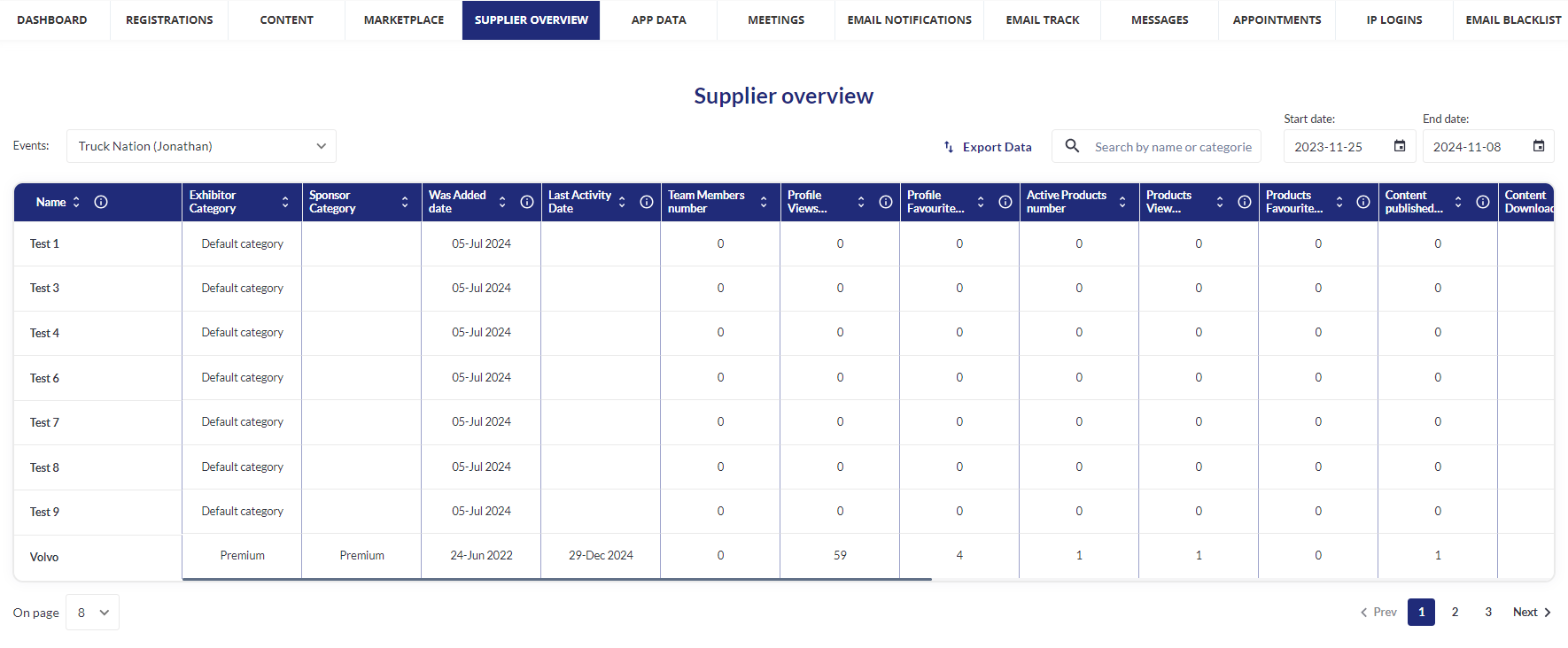
Overview of each column on the Supplier Overview page
-
Name - The name of the Exhibitor.
-
Exhibitor Category - The Exhibitor’s Category (categories can be managed in Registrations Settings >>> Exhibitor >>> Categories).
-
Sponsor Category - (If enabled for the particular Exhibitor). Sponsors ca be managed in Management >>> Sponsors.
-
Was Added Date - Date Exhibitor was added to the event (or platform if All Events is chosen).
-
Last Activity Date - Date Exhibitor was added to the event (or platform if All Events is chosen).
-
Team Member Number - The total number of team members for the Exhibitor.
-
Profile Views Number - Number of times the company profile and a team member profile have been viewed.
-
Profile Favorited Number - Number of times the company profile and a team member profile have been favourited.
-
Active Products Number - The number of active products for each particular Exhibitor.
-
Products View Number - Number of times a Product was viewed.
-
Products Favorited Number - Number of times a Product was favourited.
-
Content Publish Number - Number of Marketing Content items added to company and product profile.
-
Content Downloads Number - Number of times a Marketing Content item has been downloaded.
-
Chats Number - Number of chats initiated or received by the exhibitor and his team members.
-
RFPs Received / Accepted / Declined - The total number of all RFP interactions (received, accepted, declined).
-
Meetings (incoming, pending, canceled, confirmed) - The total number of all meetings and their interactions for each Exhibitor and their team members.
-
Badge Scans - How many badges were scanned by Exhibitor and his team members.