
Attach Speakers/Moderators to Events/Sessions by external code
Now we have a functionality wherein the organiser can import Speakers/Moderators to the Session /Exhibitor Event by using an external id attached to the speaker/moderator vis using the Session Import file or API or other thyroid party integration
A new column has been included in the session import file to add the External ID for the participants(Speaker/Moderator).
The system is able to link sessions with participants (speakers/moderators) using the External code during the import process.
The external code is included in the list of merged fields to map the speaker/moderator using the external ID
If there are multiple speakers passed via API it should be separated by double pipes.
If there are multiple speakers imported via import, they should be separated by comma(,)
A new column external ID is added to the Visitor Export file which downloads the External ID details for speakers/moderators

Benefit
-
Ability to add/map speakers/moderators to the session via import or API by using their external id
Events Security concern, Ability for Organizer to set questions for Exhibitor
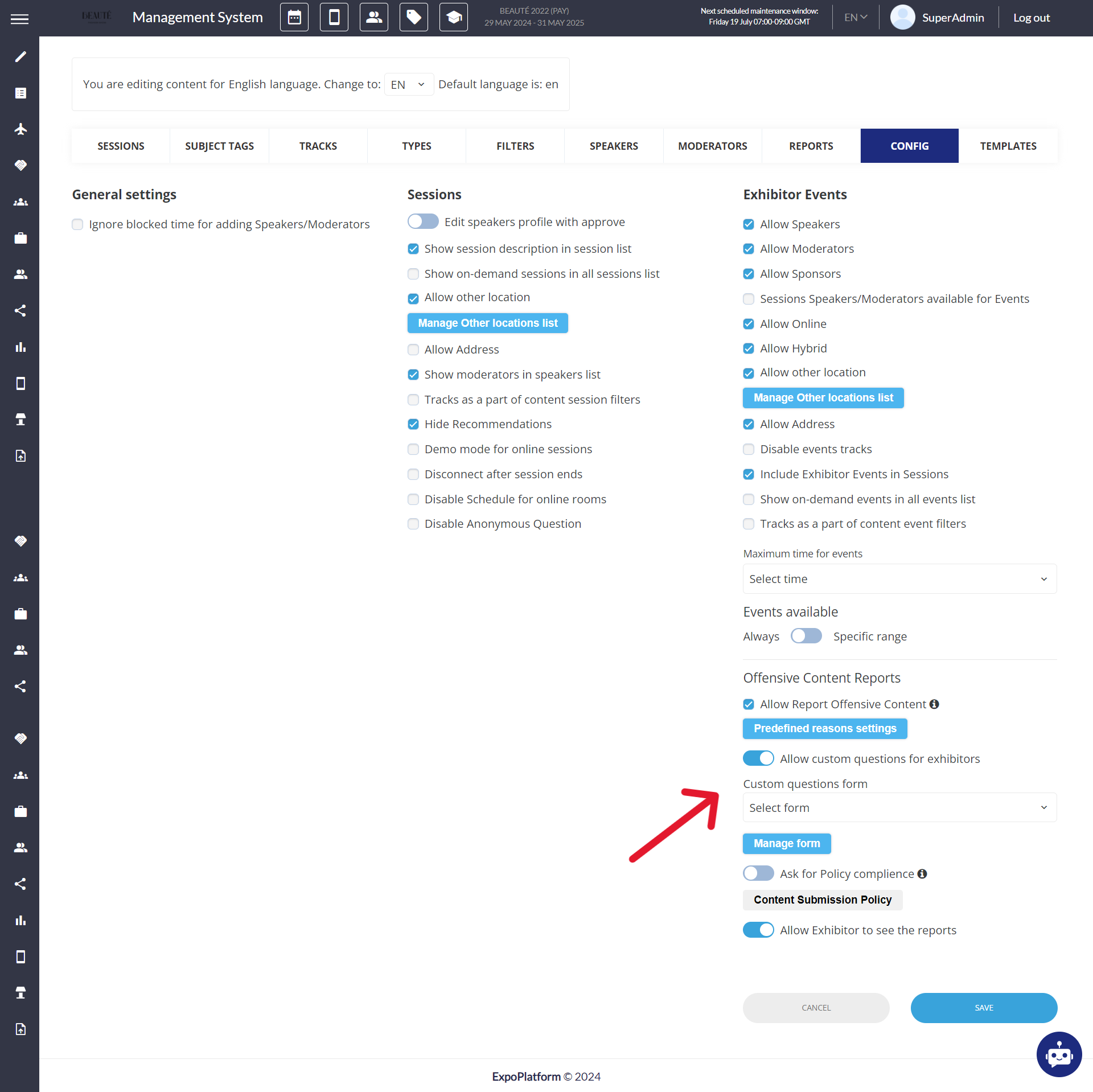
The organizer now has the option to add custom questions to exhibitor events using the custom form feature, which the exhibitor must answer when submitting their event from their frontend profile.
Admin Panel Settings: Management → Session → Session Config → Exhibitor Events → Enable Allow Custom Questions for Exhibitor Events
The answers to these questions are visible in Read Only format to the organiser on the admin panel on the exhibitor event edit page
Exhibitor View: When Exhibitor clicks on Add Exhibitor Events, they will see these questions at the bottom of the create exhibitor event page
Exhibitors must agree to the Policy by checking a box and clicking a button to view the Policy on a separate page before submitting.
Benefit
-
It ensures all exhibitors provide essential information upfront, allowing organizers to assess and mitigate potential risks of security breaches before approving an event
Change Time Format
A small change has been made to the time format across the event, now the event reports will showcase the time zone as per the country selected on the General Info page, initially, it was showing Greenwich Mean Time, GMT+1
Time setting in admin/general/settings dominates over setup in admin/general/edit. The above change has been done on the below places
-
All reports in admin/data
-
All imports in admin/data/import
-
In admin/events/, Reports tab for all reports - By Session, By Booking, By Rating.
-
admin/stat/Meetings
-
admin/stat/general#sent
-
admin/stat/general#track
-
admin/stat/general#appointments
-
admin/hostedbuyers/agents
-
admin/hostedbuyers/meetings
-
admin/hostedbuyers/emeetings
-
admin/visitors - Export QR codes, Batch Print badges.
-
admin/exhibitors/list - Export QR codes
-
admin/registration/incompletelist
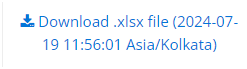
Also, a small change has been made to the download file name, where it will now indicate the event time zone at which the report is generated Download .xlsx file (2024-05-16 09:51:13 Europe/Kiev)
If the time zone is changed for the event, it will apply to all future reports. However, the time zone for existing reports that were generated before the change will remain the same.
Multi-Language Session/Exhibitor Event Import
On the Admin Panel now we have the option to import sessions and exhibitor events in multiple languages.
The organizer needs to manually create the additional session name fields/columns in the session import file for the desired language. Once created, these fields should be merged into the Merger Header of the session import.
The Session import Merger Header includes the fields to merge the session name and description in multi-language based on the languages enabled at the event and added to the session import file
Benefit
-
The organizer can import sessions and exhibitor events in multiple languages that are enabled for the event.