
Error Mechanism for Meetings and Messages Limit
To maintain the consistency of the Meeting and Message allowance limit set for the Participants and Exhibitor category, the limitations are now being transitioned on the event app as well. So now irrespective of the device the user uses the Message and Meeting limitations are followed as per the set limit under category settings.
How limitations work for regular meetings
When autoconfirm is turned on:
-
Pending limits are not factored for any meeting side.
-
Confirmation limit is counted for the meeting receiver.
-
While rescheduling the pending meeting – category limit is not applied.
-
While rescheduling of confirmed meeting – category limit is not applied.
When autoconfirm is turned off:
-
Pending limits are counted for meeting initiation.
-
Confirmation limits are counted for meeting receiver.
-
While rescheduling the pending meetings – category limit is not applied.
-
While rescheduling the confirmed meeting – category limit is not applied.
Table meetings have the same limit logic as regular offline/onsite meetings.
The System shows an error message both on the web and the app when the user exceeds the allowed limit for Meetings and Messages
Benefit
-
Avoids functional discrepancies related to the limitations set for Meeting and Messages when used on various devices
Change Time Format
A small change has been made to the time format across the event, now the event reports will showcase the time zone as per the country selected on the General Info page, initially, it was showing Greenwich Mean Time, GMT+1
Time settings in (admin/general/settings) is dominating over setup in admin/general/edit. The above change has been done on the below places
-
All reports in admin/data
-
All imports in admin/data/import
-
In admin/events/, Reports tab for all reports - By Session, By Booking, By Rating.
-
admin/stat/Meetings
-
admin/stat/general#sent
-
admin/stat/general#track
-
admin/stat/general#appointments
-
admin/hostedbuyers/agents
-
admin/hostedbuyers/meetings
-
admin/hostedbuyers/emeetings
-
admin/visitors - Export QR codes, Batch Print badges.
-
admin/exhibitors/list - Export QR codes
-
admin/registration/incompletelist
Also, a small change has been made to the download file name, where it will now indicate the event time zone at which the report is generated Download .xlsx file (2024-05-16 09:51:13 Europe/Kiev)
If the time zone is changed for the event, it will apply to all future reports. However, the time zone for existing reports that were generated before the change will remain the same.
Benefit
-
For better accuracy of data and actions taken during the event, all reports are generated according to the event's time zone.
Renaming setting under Contact Sharing
The team has renamed a setting under Networking and Matchmaking >> Contact Sharing from Watched On Demand/Online Session to Watch On-demand/Online sponsored session.
Also, in the download Lead report file, the reason for lead should be updated to Watch On-demand/Online sponsored session.
Benefit
-
A clearer explanation of why a user is counted as a lead
Option to add Internal Notes for Sessions
We have added an option to include internal notes on the admin panel while creating a session. This is a similar function that we have on the Participant and Exhibitor edit page on the admin panel.
The internal Notes are also included as part of the session import and export file
Benefit
-
Option for the organiser to add internal notes while creating a session on the admin panel
Mark Sessions as Critical
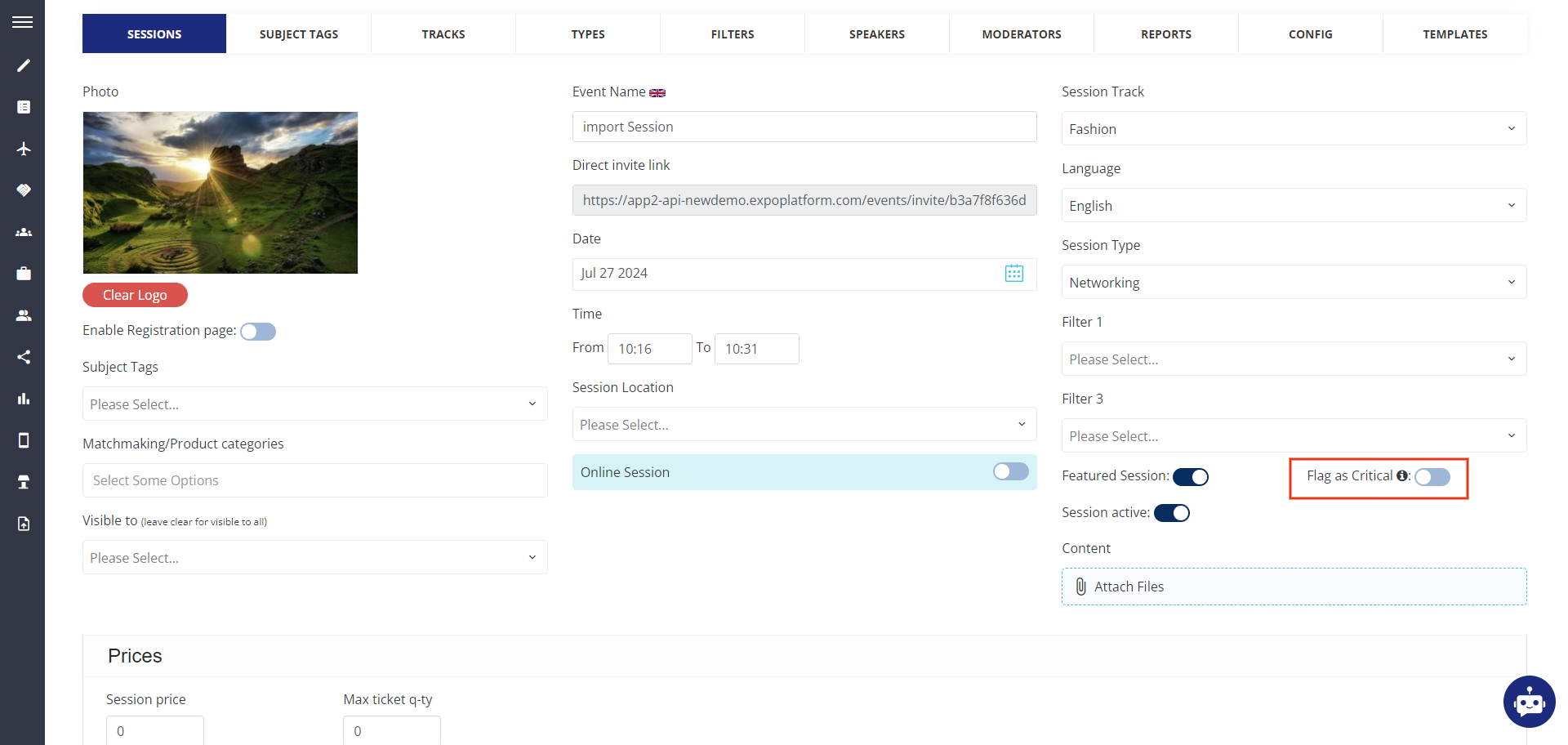
A new checkbox field is added to the session edit page from where the organiser can mark that session as critical.
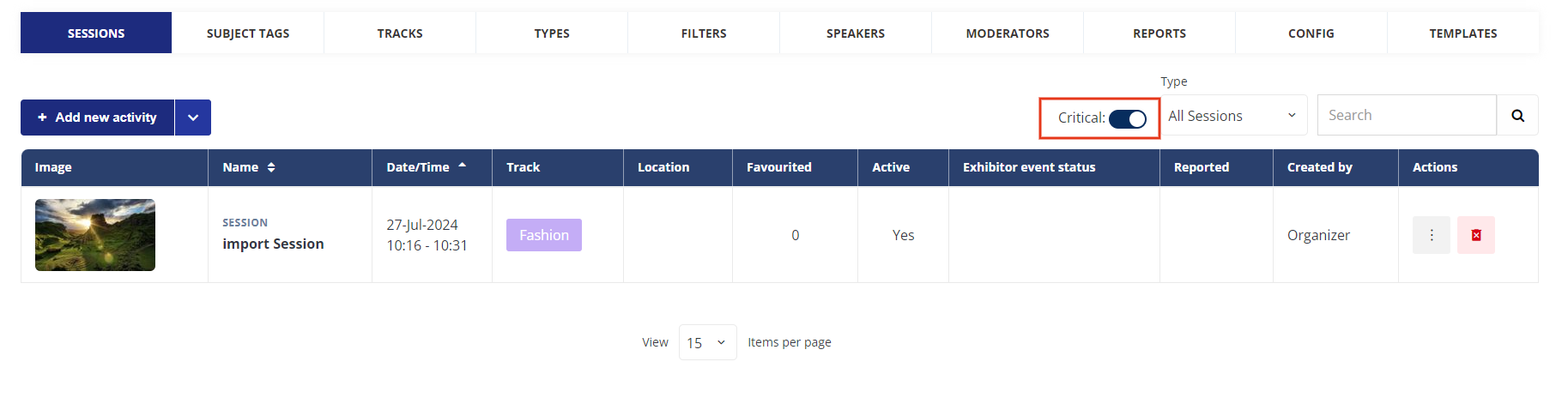
The session list page will also include a column that would list if the session is tagged as critical or not.
Additionally, a new filter is introduced to the session list page that would allow the organiser to filter out the session marked as critical for regular review.
The session import and export file will now include an additional column to indicate if a session is tagged as critical.
Benefit
-
Option for the organiser for easy reviewing of critical sessions for regular check and update