
October Releases
Exhibitor-Category-Default-Limit-Presets:
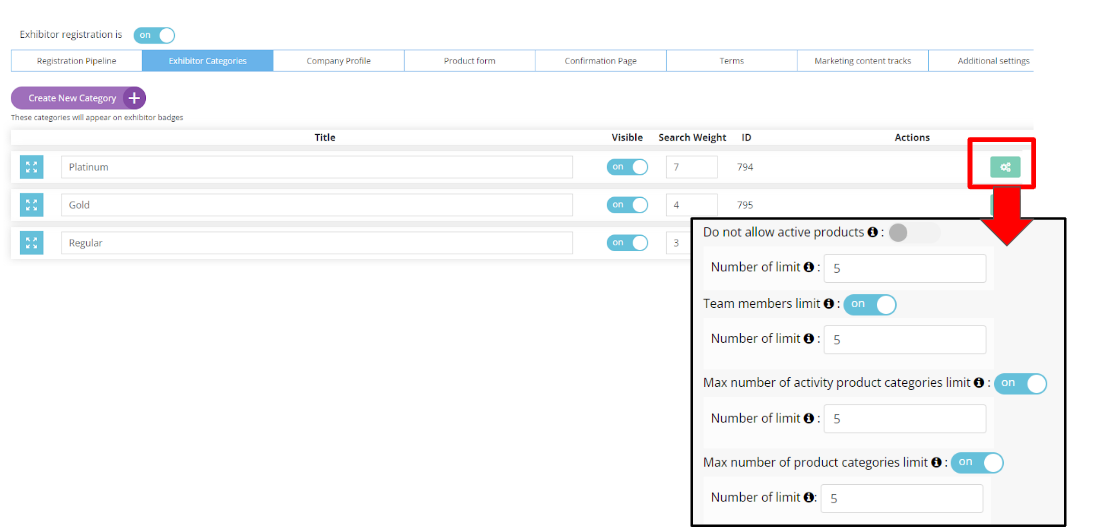
For each exhibitor category, where any of the following are being limited, when the limit toggle is enabled each item will have a default preset of 5
-
Number of active products
-
Number of team members
-
Maximum number of active product categories
-
Maximum number of product categories
Benefits:
-
Avoids confusion by having the field left blank or pre-filled with a 0
-
Avoids organizers accidentally setting the limit to unlimited if they don’t understand what 0 means
30-Minute Meeting Option:
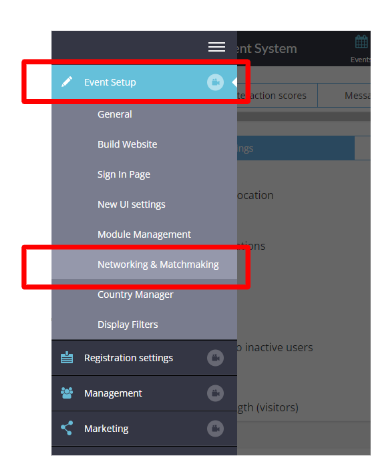
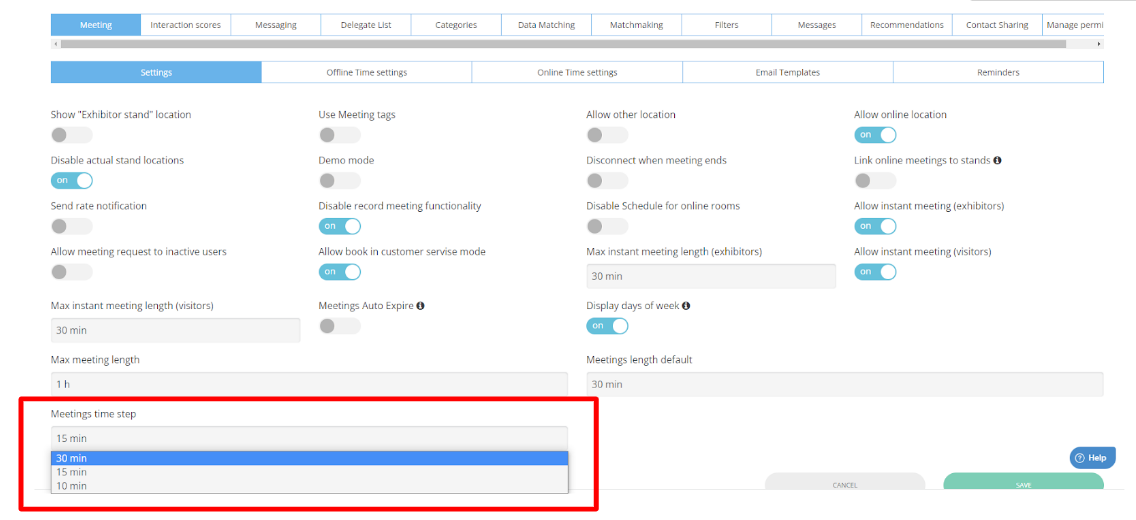
New option to display 30-minute intervals for meetings on the meeting time selection screen
-
For both mobile and web
-
For both regular meetings and table meetings
Benefits:
-
Increased flexibility for the organizer
-
Improved usability for users who want to select a 30 minute time block
Session Sorting & Reporting Enhancements
A set of enhancements that give the organizer additional insight into session engagement:
-
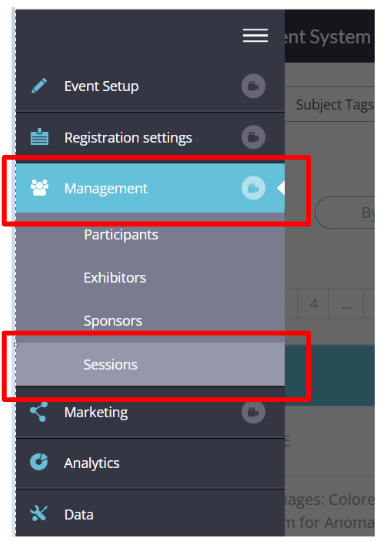
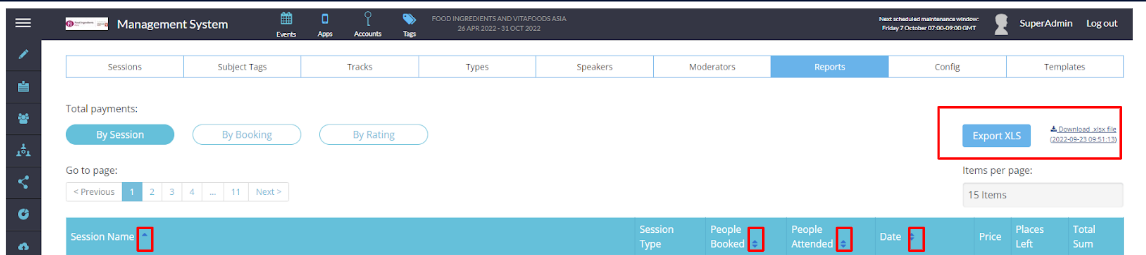
See how many people booked a session and how many actually attended right on the sessions management page
-
Sort on the session management page by:
-
Session Name
-
Number of People Booked
-
The number of People who Attended
-
Session Date
-
-
Export now has a new All Sessions tab with total booked and total attended data for each session al on the same tab
-
Export now has an All Registrants tab with data for each registrant showing which sessions they booked and which they attended




Benefits:
-
Organizer can more easily manage their sessions with the new sorting options
-
Organizer can more easily analyze session data with the enhanced export
Filters Management
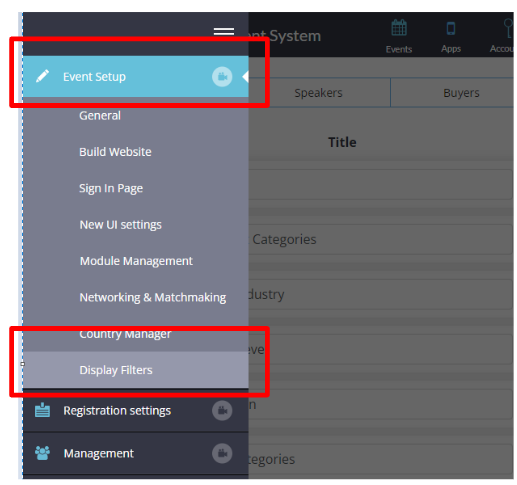
Ability to manage the front-end display of filters. From this new settings page, the organizer can control:
-
Name of each filter
-
Order of filters displayed on the front-end
-
Who should/should not see each filter
These settings can be applied to the filters on each of these pages:
|
o Brands o Buyers o Delegates |
o Exhibitors o Groups o News
|
o Pavilions o Products o Sessions o Speakers |
Benefits:
-
Organizer can more easily manage their sessions with the new sorting options
-
Organizer can more easily analyze session data with the enhanced export
Do Not Allow News - Exhibitor Category Level Permission
-
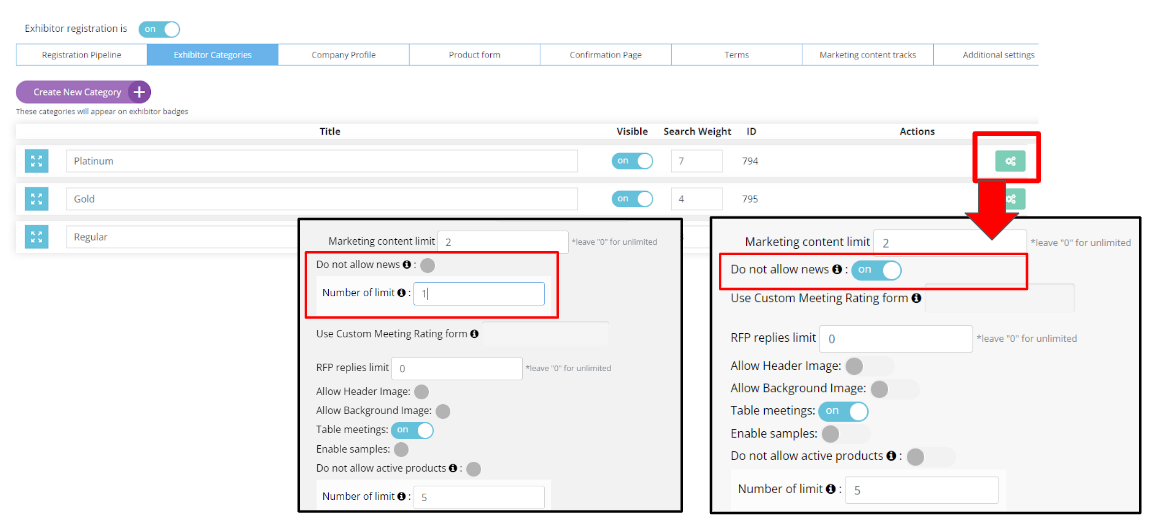
For each exhibitor category, there is now a new setting that the organizer can toggle on to allow news items for that category, and indicate the number of allowed news items, or toggle off to disallow news for that entire category
-
As with other category settings and limits each category can have its own unique settings
-
As with our other category level limits, when the toggle is on the default limit will automatically be pre-filled, in this case with 1 as the default, but this can be changed as desired
Benefits:
-
By being able to control whether each exhibitor category is allowed news items, and controlling how many news items independently for each category, news can now be a new monetization opportunity for organizers.
-
A new setting in the exhibitor category settings page gives organizers the ability to offer new items for only certain categories and to control how many news items each of those categories is allowed.
Progressive Profiling
-
Within the registration pipeline, each custom tab now offers 2 new choices:
-
Hide on Registration
-
Hide on Edit Profile
-
-
This allows the organizer to slowly collect additional information about the user over time by starting with a simple registration form and then enabling additional custom tabs with more detailed questions later on and asking users to update their profiles to complete these additional fields

Benefits:
-
Organizers can collect detailed data about users without overwhelming users by asking for all information during initial registration.
-
Two new settings now allow each custom tab in the registration pipeline to be visible/invisible on the registration form and in Edit Profile, independently of each other.
Option to hide Custom Participant categories anywhere it appears
Ability to hide participant categories on the frontend, as for most events they are for internal use only.
This setting can be toggled by going to (/admin/registration/categories)

|
On Web |
On App |
|
|
Benefits:
-
Hide categories that you may not want to showcase to end users
Deep Links for Badge Scan (scanning badges with a phone camera)
Ability to scan a badge outside of the event mobile app (ex. with a phone camera or QR code scanning app). If:
-
The badge is scanned and the user has our app installed, the app is opened, the user is asked to log in (if unlogged), the app opens the Scan Badges page and the regular flow of badge scanning proceeds
-
The badge is scanned and the user has not installed our app, the event is opened in a mobile browser, the user is asked to log in (if unlogged) and then redirected to the public page of the scanned user
-
The badge is scanned and the badge has an external QR code and the user has not installed our app, then nothing happens.
-
The badge is scanned inside the app, scanning works exactly the same as before
Benefits:
-
Users who have not yet installed the event app can still scan badges
-
Users who don’t understand that badge scanning is a feature within the app will now be able to use their phone camera to scan, capturing a scan that would have been captured in the past.
Lead Scanning Improvements
2 improvements to the lead scanning experience:
-
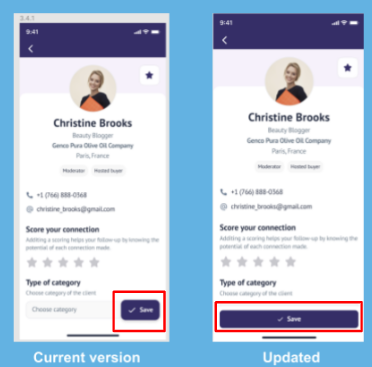
As soon as a lead has been scanned, their name and contact info (if allowed) are automatically saved to the exhibitor’s scanned badges list and the timestamp of that scan is saved in our database
-
The save button below the notes and rating section has been made bigger
Benefits:
-
Should the exhibitor forget to save the lead after scanning, he will at least have name and contact info
-
Organizer will have more accurate data about the number of scans that occurred
-
Bigger Save button is a bigger visual cue and reminder to the exhibitor to save their notes and ratings
Download Who Scanned Me From Web
-
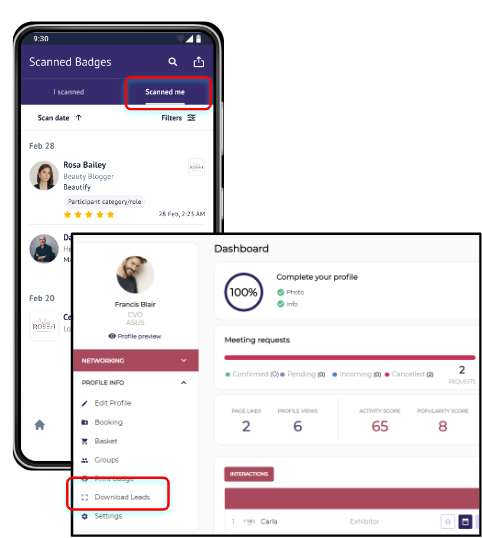
Earlier we released Who Scanned Me with the ability to export that list from your mobile app. Now that list can also be downloaded from the web.
-
Similar to Download Leads for exhibitors, the Organizer will have a toggle to turn on/off that will control whether the Download option appears on the front-end under as a link under Profile Info
Benefits:
-
Ability to download the list of Who Scanned Me from the web, rather than emailing it to myself from the mobile app
-
New feature that allows users to download the list of who scanned them from the web in the Profile Info section
Ability for User to Turn On/Off Meeting/Messages
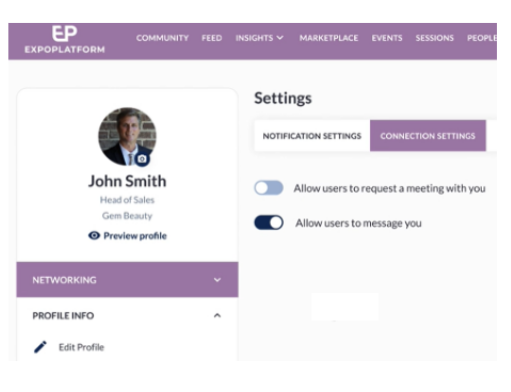
New Connections Settings tab will offer users the ability to choose whether or not they want to receive meeting requests and whether or not they want to receive messages
-
If they choose not to receive meetings, the meeting button will not appear on their profile card
-
If they choose not to receive messages, the message button will not appear on their profile card
Benefits:
-
Users now have more control over how they are contacted on the platform while still providing them with flexibility should they change their mind.
-
Two new settings, located under a new Connection Settings tab, allow users to choose whether they wish to receive meeting requests, messages, both or neither. The buttons on their profile card then update automatically to reflect the user’s choices and the user can change their choice at any time.
Ability to Change Border Color for Sponsors & Sponsored Products
A new setting under General > New UI settings will allow the Organizer to choose the colour of the border for sponsors and sponsored products.
Benefits:
-
Organizers have more control and can provide a more consistent branding experience
Native Floorplan Page Sponsorship (Web Only)
-
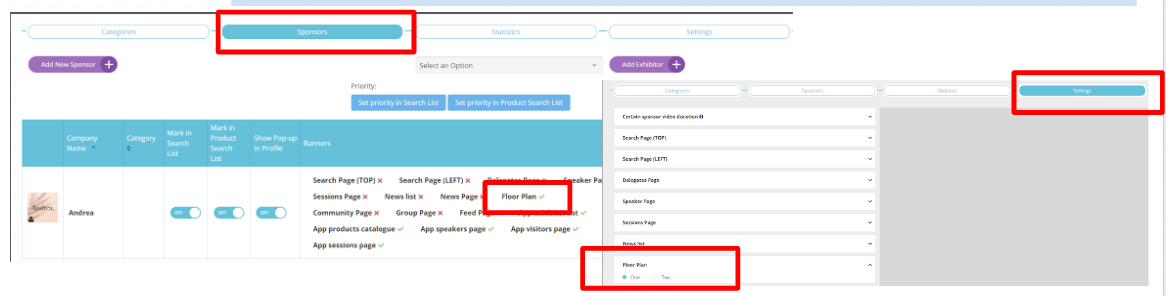
In Management > Sponsors > Sponsors, banner ad(s) on the Floorplan page can now be turned on for a particular sponsor
-
As with other pages, under Management,> Sponsors > Settings the organizer can choose between one banner across the top of the page or two
-
As with other pages, banner ads for the Floorplan page can be uploaded by clicking on the sponsor’s name on Management > Sponsors > Sponsors
Benefits:
-
Additional monetization opportunity for the organizer
-
New advertising opportunities for exhibitors
UI/UX Enhancements
|
What is it? |
Design |
|---|---|
|
New Design Options for “We’re Exhibiting At” Block Within the “We’re Exhibiting At” block of an exhibitor listing, the design is more flexible and will adjust for:
|
|
|
Messaging Button Updates Within messaging, in a group chat, there are a number of different options available to the group chat admin for each chat participant. With this update the group admin can now:
|
|
|
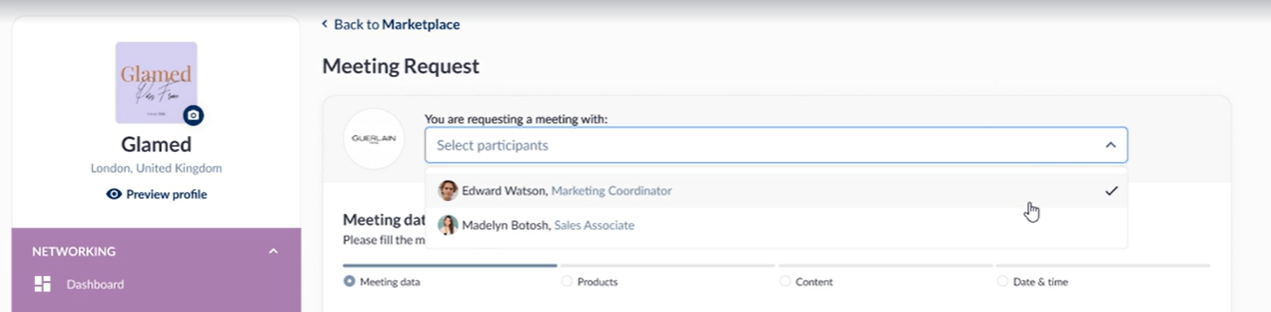
Job title visible when we choose Exhibitor's team member (web)
|
|
Expected Features to be released - November Cycle
|
Feature |
Description |
Focus Area |
|---|---|---|
|
QR scans export |
Extraction of qr scans report (products, exhibitors, content, visitors) from Data → Import/Export section for post show analysis |
Analytics |
|
Search Function for products on lead capture page |
Ability to search for products using name on the lead retrieval page |
UI/UX Enhancement |
|
Clickable Person Name & Company Name |
Swiftly navigate between team member & exhibitor company profiles. View more information related to an individual user by navigating to their individual profile without browsing the entire attendee list. |
UI/UX Enhancement |
|
Badge Builder Improvements |
QR code re-sizing, field rotation, , adding margins |
UI/UX Enhancement |
|
Expose Deeplinks for external use |
Ability to download an export of deeplinks for participants, products, exhibitors for external use |
Marketing |
|
Meeting Additional Settings |
|
Meetings |
|
Sponsor Logo within app (Sessions) |
It will enable clickable sponsor logos to be visible within the mobile app. |
Monetization |