
Sponsored Session Visible on Company Profile
When an exhibitor sponsors sessions those sessions will now show on their company profile page.
-
If an exhibitor does not have any sponsored sessions this block will not be shown
-
Sessions cards remain unchanged
Benefits:
-
Additional exposure for exhibitors sponsoring sessions
-
The ability to show a user who is already interested in them which sessions that exhibitor is sponsoring
News Character Limit - Category Level:
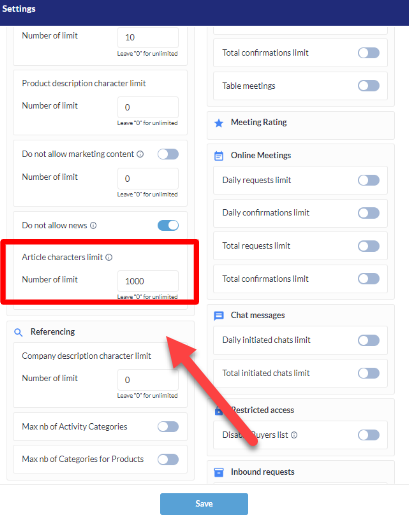
A new admin setting allows Organizers to increase the current news article limit of 1000 characters or allow an unlimited number of characters.
If a limit is set, or decreased, after exhibitors have already added news articles, the articles will not be affected unless the exhibitor edits the article. After editing the exhibitor would be prompted to shorten the article before being allowed to save.
Benefits:
-
Additional monetization opportunity for the Organizer
-
Richer content for end users
-
More flexibility for the exhibitor
Default number of exhibitors - Marketplace Page:
A new admin setting allows the Organizer to decide how many exhibitors should be shown by default on the Marketplace/Exhibitors page. (Event Set Up > General > Settings)
|
|
|
Benefits:
-
Additional monetization opportunities for the Organizer (since there are more exhibitors shown by default, there are more Featured Exhibitor opportunities)
Ability to remove product category auto-selection:
Under Networking & Matchmaking > Categories, when Selectable Parent Category is turned on, there is now a new setting called Bulk Selection of Sub-Category Items that can be toggled on or off.
This setting is applicable only to edit profile section.
|
Selectable parent category |
Bulk selection of sub-category items |
Result |
|---|---|---|
|
OFF |
Hiden |
Bulk selection is imposible. |
|
ON |
ON |
Bulk selection of sub-categories when clicks on category checkbox. |
|
ON |
OFF |
No bulk selection of sub-categories when clicks on category checkbox, only clicked checbox checks. |
Benefits:
-
Improved user experience
-
Better Matchmaking result
Removal of stand location option after the physical event ends:
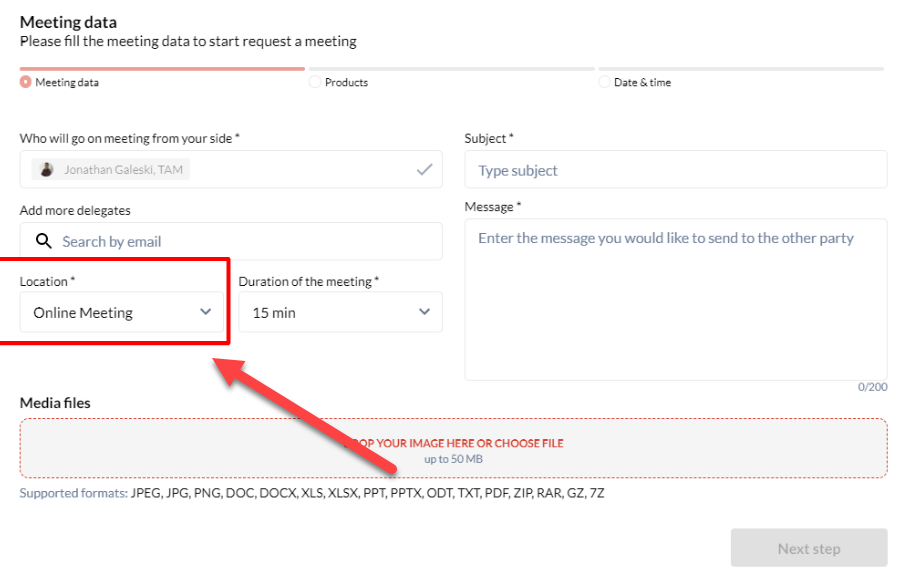
When the offline meeting period has expired (determined by Event Set Up > Networking & Matchmaking > Meeting > Offline Time Settings), then when a user requests a meeting, Online Meeting will be the only option.
Web Only Feature, App will be at a later stage
|
|
|
Benefits:
-
Improved user experience
-
Reduced number of missed meetings
Session ID Column - Report:
The All Sessions tab of the Sessions report (under Management > Sessions > Reports > By Session) now includes a column containing the session ID.
Benefits:
-
Can be used to map session ID with other reports available in system for better analytics