
User-Friendly Error message when inactive user logs in to the event - App
When inactive users attempt to login to the event from the mobile app, the system will show an error message: “You haven’t activated your Account, please check your email for the activation link”, giving the user a clear indication of why they are unable to login to their profile.
Additionally, users can also send an activation link to their registered email address. As a result, they will be able to activate their profile at that instance and can log in to the event for further actions
Benefits
-
User friendly
-
Ease in activating the profile and accessing the event
-
Clear and user friendly message to the users for not able to login to the event
Leads Download to Include - All Meeting Requests
Download Lead and Badge scan report will now include all meeting requests that have been booked with the user.
Admin Panel Setting: enable toggle Include all meeting statuses from Networking & Matchmaking → Contact Sharing


Default State : OFF
If “Had a meeting” toggle is OFF, then “Include all meeting statuses” toggle should be perceived as OFF too and will not be visible
Benefits
-
Ability to download all meeting request that have been scheduled for the user
-
More precise meeting data for the user
Mobile app Stats page under Analytics
A new tab added on Admin Panel → Analytics → General → App Data, this will show mobile app statistics like
-
Pages viewed in the mobile application
-
Meetings and Badges-Badge scans (unique)
-
Total Android logins (unique)
-
Total IOS logins (unique)
Benefits
Availability of mobile app stats to the organizers directly on Admin panel
Exhibitor registration reCapthca
The exhibitor registration form now includes reCaptcha to prevent automated bots and spam from accessing and submitting information.
Users will not be able to complete the registration without adding the reCAPTCHA
Benefits
It avoids automated bots and spam from submitting information and helps accounting real data
Exhibitor Event Leads included in Interaction and Lead Generation
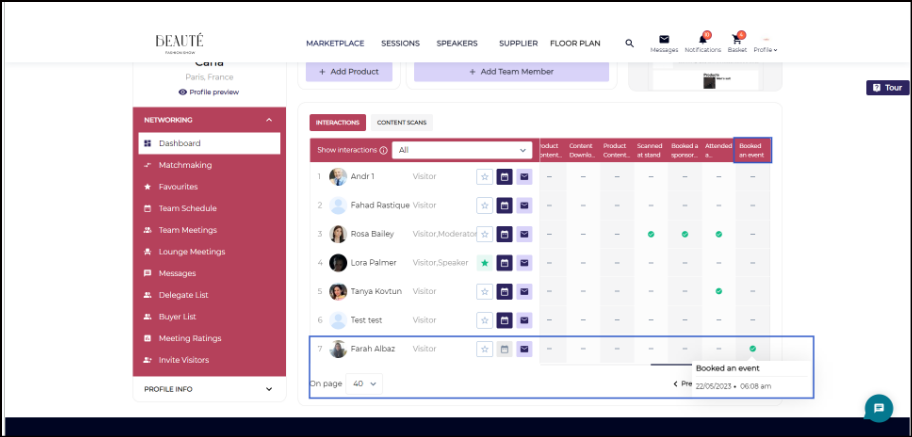
The system additionally records information about users who have scheduled/booked for exhibitor events in Lead Download reports and Dashboard Interactions along with the time stamp when the event was marked booked
Settings : Admin Panel → Networking & Matchmaking → Contact Sharing(/appointments/shared) enable toggle Booked an Event
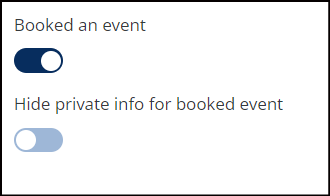
Default State: Off
A new column will appear in Dashboard Interaction if this setting is enabled. Only exhibitors whose profiles have exhibitor events listed will see this column.
Benefits
Details about users who have booked their events is now accessible to the exhibitor in Download lead and on Dashboard