
Default Category - Exhibitor
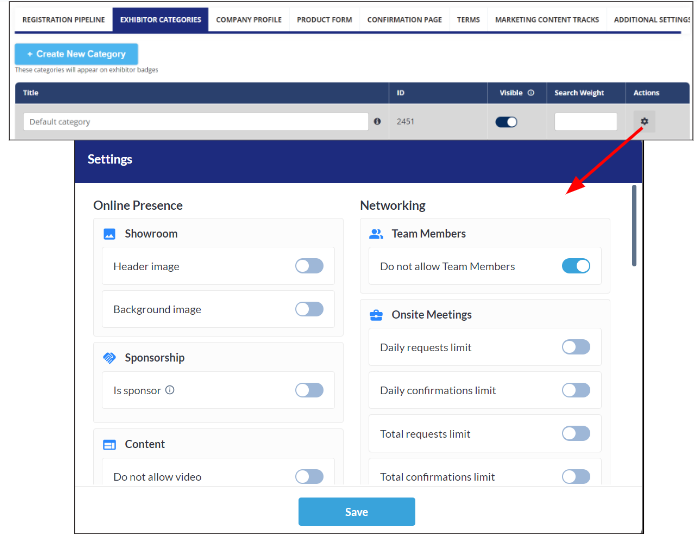
In Admin Panel we will now have a Default Category which will be auto created and assigned to Exhibitors without any Category
Default Category will have the following features
-
Default Category can’t be removed from the category List
-
Default Category will be pinned on the top of the category list and can’t be moved
-
Category Name can be changed by the organizer as per the event requirement
-
Not visible on Frontend Filter
-
The “Settings“ pop-up can be configured like other categories
-
If any custom category is deleted then all the exhibitors with that category will be assigned Default category and will auto inherits all the settings of default category
-
If the exhibitor is added to the platform without any category via import, API or manual creation will be auto-assigned with the Default category and its settings, except limits and restrictions that were set manually at the exhibitor level.
-
While switching Exhibitor category from Default to Custom or vice versa, Individual level settings will always take precedence over category settings
Do not allow Team Member: Default State On
Do not allow Active Product: Default On
Do not allow News: Default On
Benefits
Ease for event admins to control the accessibility for exhibitors without a category
Meeting Card Title: Calendar View
Changed look and feel of the meeting card on My Schedule and My Meeting Page for Calendar View
-
When hovered Colored Part : will show the participants Name, Location and timing of the meeting
-
White Part will first show the meeting title and then participant list from both the initiator and receiver end
Applicable on web only
Benefits
More details about the meeting on calendar view
Text Editor: Exhibitor News
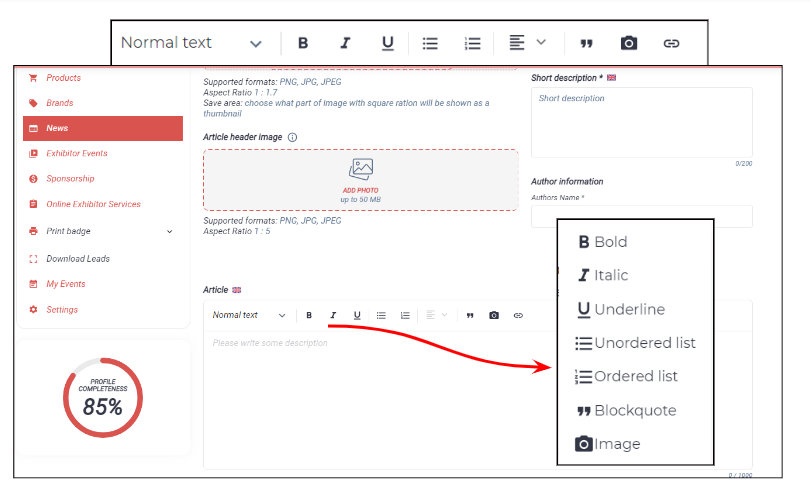
The ability for the exhibitors to add images, link and use other advanced text editor options on frontend while adding news/articles from their profile
Benefits
Allow exhibitors to use the text formation option and images and link to their news articles
Email template in Multilingual - Marketing Module
Organizers can now create and send Marketing Emails in various languages used for the event.
Note: For end user it will only work if they have pre-selected the Language Preference in registration form else email will be sent in default language selected for the event.
Benefits
Sending marketing emails in the native language of the end user making communication more effective and user specific