
Feature Purpose
While not part of the unified recommendations page, when enabled this feature provides intelligent, personalized exhibitor recommendations to enhance networking for event participants.
After a user initiates a meeting with an exhibitor, the system will suggest similar exhibitors via a pop-up and a dedicated block on the schedule page.
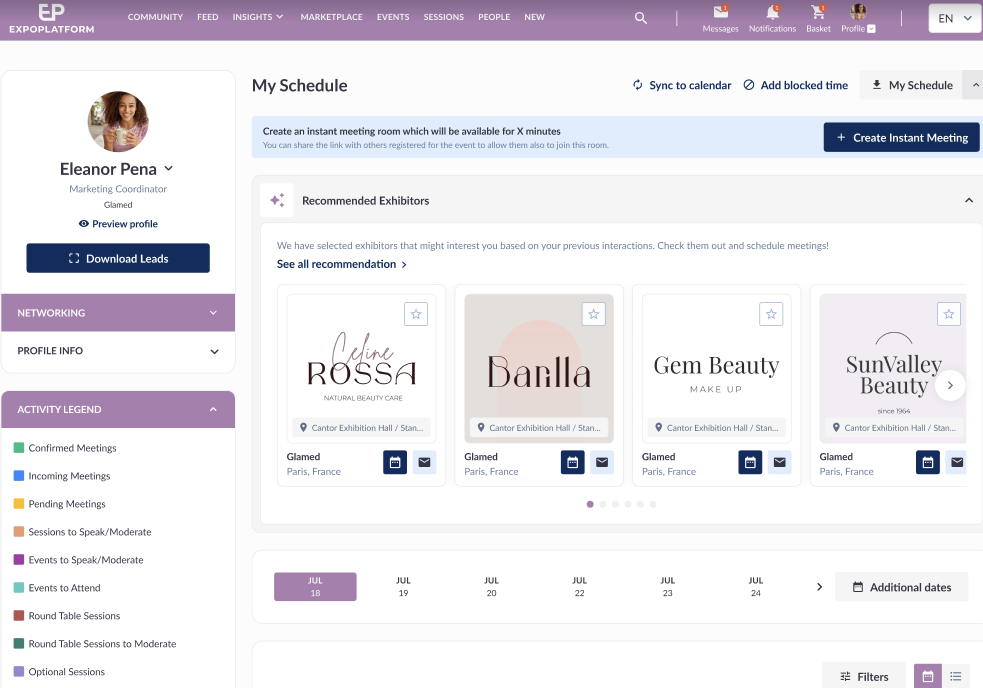
Working with this Feature
End User Experience
-
After successfully requesting a meeting with an exhibitor, a pop-up appears showing up to 20 recommended exhibitors.
-
On the “My Schedule” (for visitors) or “Team Schedule” (for company accounts) page, a “Recommended Exhibitors” block is displayed above the date selector.
-
Both the pop-up and the block are interactive: users can view exhibitor details and take actions (like requesting meetings or favoriting), depending on their permissions.
-
The “See all recommendations” button takes users to the exhibitors list filtered to show all recommended matches.
-
The recommendations are personalized, leveraging the user’s recent activity and the system’s recommendation engine.
Admin Panel Setup
-
In the admin panel, under /admin/appointments, the option “Schedule page” is available for the “Where to return user after meeting request” setting. This controls where users land after requesting a meeting.
-
The toggle, “Recommend Related Exhibitors,” is available at /admin/appointments/recommendation. When enabled, recommendations are shown to users as described above.
-
The toggle includes a tooltip explaining its function and dependencies, notably, the “Enabled Online RecSys” toggle must also be on for full functionality.
-
If “Recommend Related Exhibitors” is ON but “Enabled Online RecSys” is OFF, the UI elements appear but without actual recommendations.
-
The feature respects matchmaking permissions: if “Allow Exhibitor to Exhibitor matchmaking” is OFF, recommendations are not shown to exhibitors or team members.
Important Points to Know
-
The recommendation engine (Online RecSys) must be enabled and properly configured for recommendations to work.
-
Only up to 20 exhibitors are shown in recommendations to avoid overwhelming users.
-
The feature is permission-aware: recommendations are only shown to users who are allowed to see them, based on matchmaking settings.
-
The admin panel settings allow granular control over both the user journey (where users are redirected after meetings) and the visibility of recommendations.
-
If you encounter issues with recommendations not appearing, verify with your Technical Account Manager that both “Recommend Related Exhibitors” and “Enabled Online RecSys” are toggled ON, and that the data pipelines have been run by the Data Science team.