
Email and Platform Notifications for Exhibitor Events
The email and platform notifications have been added to notify the Organiser and Exhibitor about the status change in the exhibitor event.
Below are the email notifications added to Admin Panel → Management → Session → Template (/admin/events/templates)
For Organizers:
-
Email Notification upon exhibitor event submission for approval.
-
Email notification upon changes submitted by exhibitors to already approved events.
For Exhibitors:
-
Email Notification upon event approval by the organizer.
-
Email Notification upon approval of changes to previously approved events.
-
Email Notification upon event rejection by the organizer.
-
Email Notification upon event rejection due to security concerns.
-
Email Notification upon rejection of changes to previously approved events.
Platform notifications: For Exhibitors:
-
Notification under bell icon upon event approval by the organizer.
-
Notification under bell icon upon approval of changes to previously approved events.
-
Notification under bell icon upon event rejection by organizer.
-
Notification under bell icon upon event rejection due to security concerns.
-
Notification under bell icon upon rejection of changes to previously approved events.
The variables in the email template redirect to the Admin Panel for the Organiser and My Event Page for the exhibitor.
A new toggle /admin/management/session/config/Exhibitor Events added which needs to be enabled by Organizer to activate platform notifications for Exhibitors Events
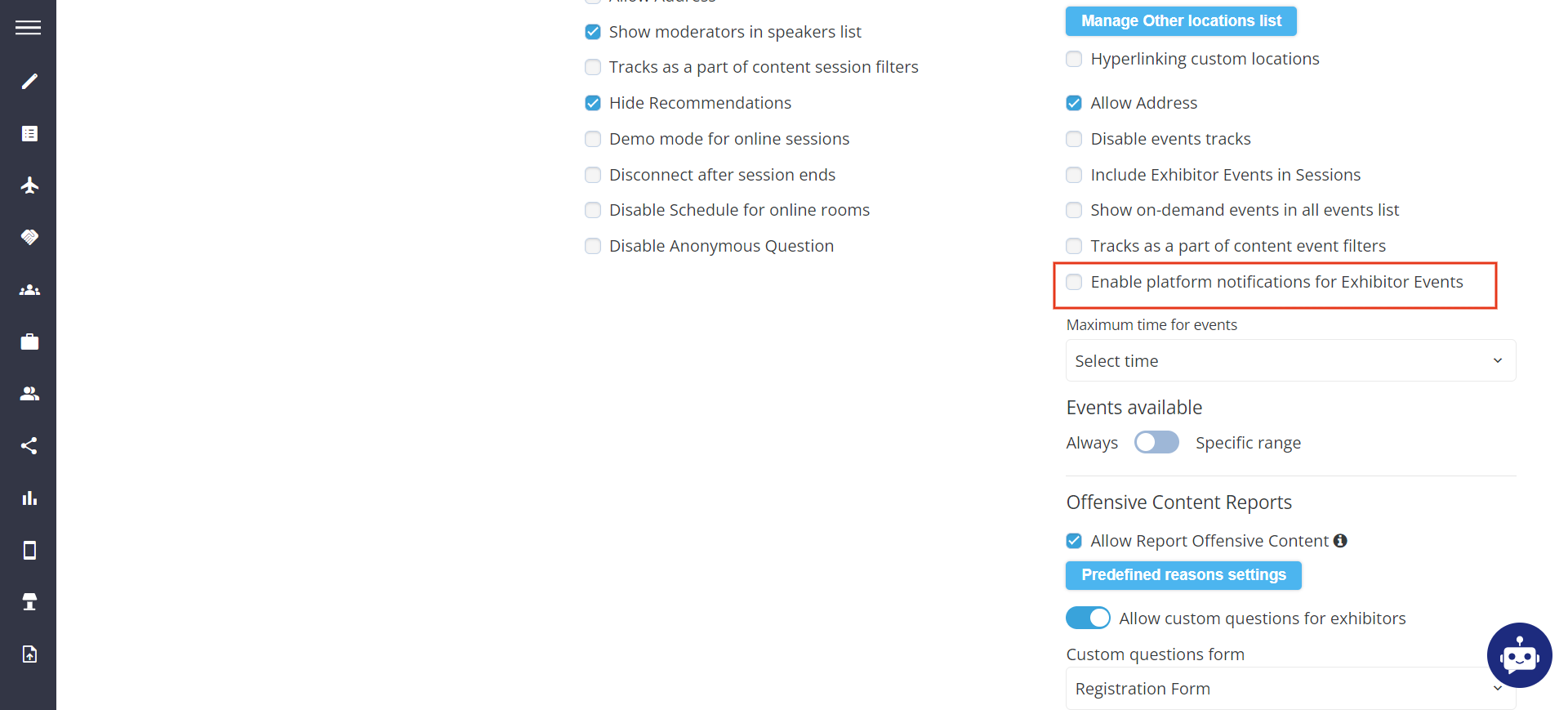
By Default Platform Notification for Exhibitor Event toggle is turned off.
For system emails to fly they need to be configured under Session >> Templates
If Exhibitor Event is disabled from the Module Management, the Sessions - Templates page will not display the exhibitor event template list
Benefit
-
Ability of the platform to send email and platform notifications for any changes in the exhibitor event status
Matchmaking Sorting on all marketplace and delegates pages
This feature allows the end user to sort the object data on the Marketplace and Delegate page based on the Matchmaking algorithm. On frontend a new toggle Recommended for You has been added, which sorts the data on the page as per MM recommendation. If this toggle is turned off the data is displayed in alphabetical order (A-Z)
-
The sorting on the Exhibitor and Product page is applied only to exhibitor and product and not to sponsored exhibitor and Products
-
Recommended for You works with the filters as well
-
If elastic search is turned off and the user is making a search, the results will be sorted in order A-Z and not as per the Recommended for you sorting option
-
If Elastic search is turned on and the user is making a search request, the results will be sorted by elastic score & "Recommended for You" doesn’t work with the elastic search.
-
When MM is disabled Recommended for You becomes hidden. The only sorting option in this case is alphabetical one A-Z
-
If Allow Visitor to Visitor MMis turned off, the Recommended for You sorting doesn’t work, similarly, it is applied to Exhibitor & Exhibitor MM is disabled
-
In participant category settings if hide matchmaking on frontend enabled it doesn’t affect sorting
-
If MM % is 0, in this case, we will have a random order.
-
Unlogged users don’t see the Recommended for You sorting option on the front.
-
In the case of a Multilingual event, the text is translatable
-
Recommended for You" doesn’t show any result if Reset filters and Copy link to applied filters is used
The Recommended for You works on web only
Benefit
-
Ability of the system to display data based on MM sorting
Networking filters for Attendees and Exhibitor (Meeting)
New filter option Existing Meeting Initiator and the Existing Meeting Status added for the Attendee and Exhibitor page under Display Filter on Admin Panel. The “Existing Chat” filter is included for pages: Delegates, Speakers, Buyers, Exhibitors, Pavilions, and Products.
On frontend these filters are visible based on the enablement on the Admin Panel. The “Existing Meeting” filter option includes “Meetings I have requested with others and Meetings requested with me
-
Logic between filters is AND.
-
Logic between filter options – OR.
This filter factors in all Confirmed, Pending and Incoming meetings
-
When no filter is selected, all cards, regardless of meeting status, are displayed.
-
When "Confirmed" is selected, only cards with at least one confirmed meeting are displayed.
-
When "Incoming" is selected, only cards with at least one incoming meeting are displayed.
-
When "Pending" is selected, only cards with at least one pending meeting are displayed.
When the user has multiple meetings with different statuses with a user, then that user appears in every matching search result.
When the "Meetings autoconfirm" setting iis turned ON, "Incoming" and "Pending" options is hidden
For exhibitor company account filtering results to check both meetings of Exhibitor or his Team Members.
This features works on Web only
Benefit
-
Additional filter option added to the frontend to filter out the user data based on Meeting initiation and meeting status
Enhancing Account Switcher Visibility and Accessibility
A design addition has been made to the Account Switcher Visibility and Accessibility for the user.
A drop-down menu has been added to show all possible profile for switching. The dropdown added in the top right burger menu.
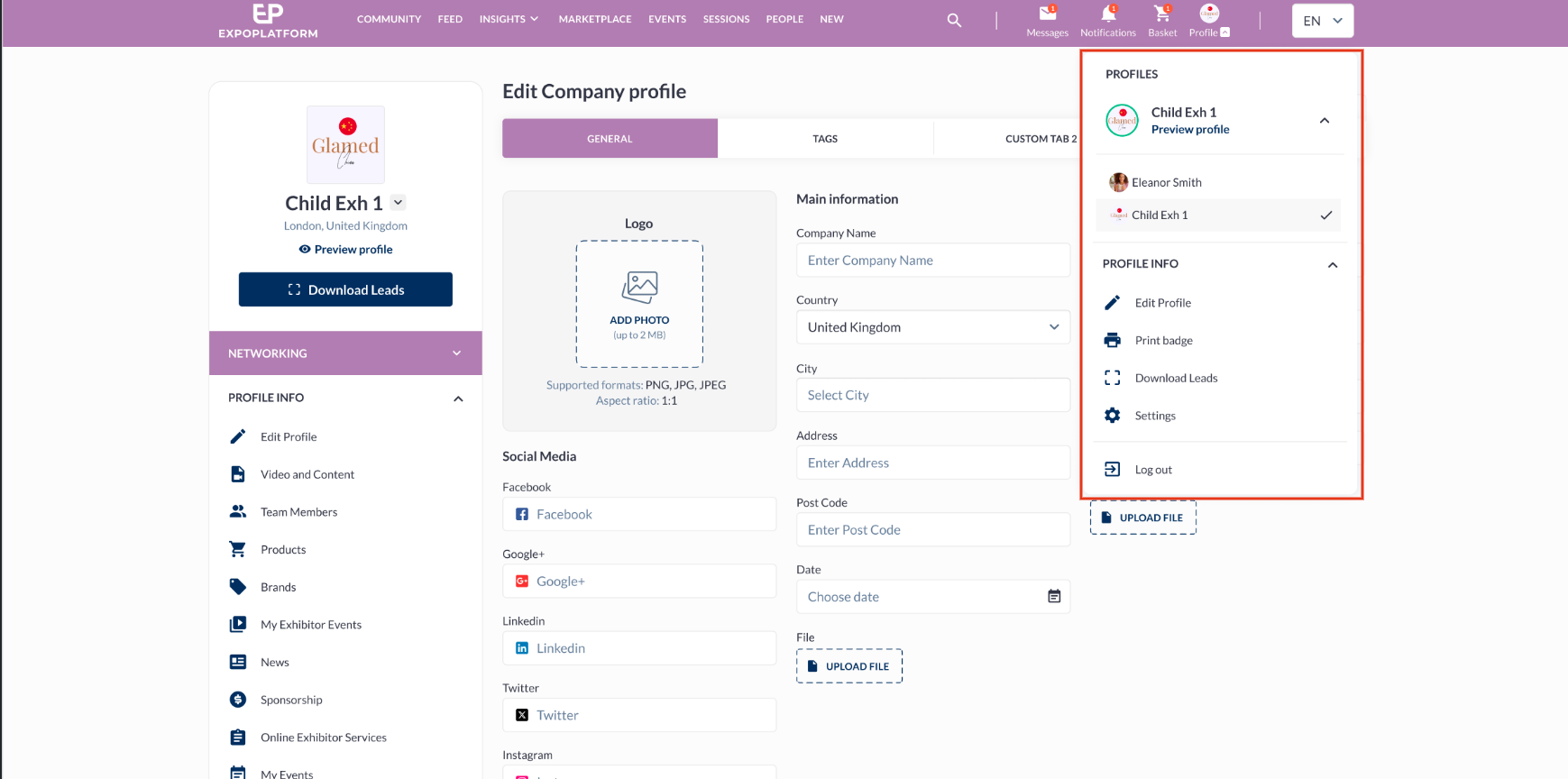
A scroller is added in case there are more than 5 accounts available for switch.
Benefit
-
Enhanced UI/UX for better visibility of switching between Exhibitor profile and Admin Member profile
Matchmaking Sorting for custom listing
When the custom listing option is enabled for the Delegate and Exhibitor page, then the sorting either works for a table (in any column) or MM sorting works based Recommended for you toggle
Choosing the sorting option in any column for the table will automatically deactivate the Recommended for you sorting
The custom listing works on following pages: exhibitor, pavilion, delegate, buyer and speaker page.
Here are the settings that result in the disappearance of the Recommended for You component from the page:
-
When Matchmaking in admin/br/br is turned off.
-
If in admin/br/br the setting Allow Exhibitor to Exhibitor MM is turned off, in this case, this gradient is not visible for exhibitors and team members on the exhibitors and pavilions' pages.
-
If Matchmaking is turned off in Module Management for the specific cohort of visitors.
Benefit
-
Availability of MM sorting on Custom Listing page view