
Feature Purpose:
Search Within Filters adds a search field inside category filters on the front end. This helps users find the option they need in long filter lists, such as an Exhibitor Category or Product Category filter with many items, without scrolling through the whole list.
Working with this Feature:
Navigate to Networking & Matchmaking → “Categories” and turn on the “Search Within Filters” toggle. The toggle is off by default.
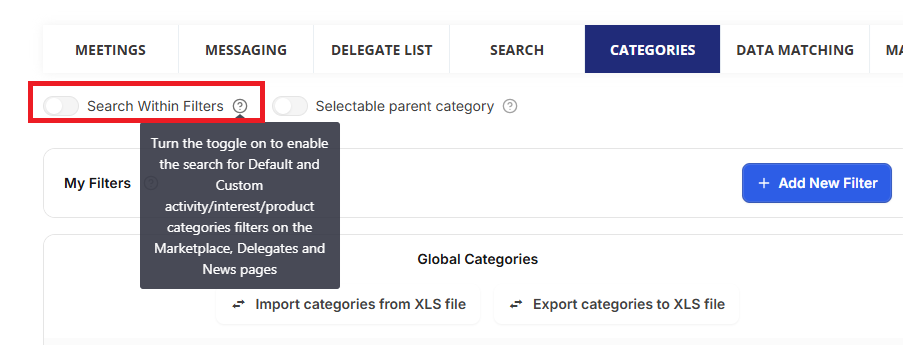
When the toggle is on, a search field is displayed in category filters on the front end.
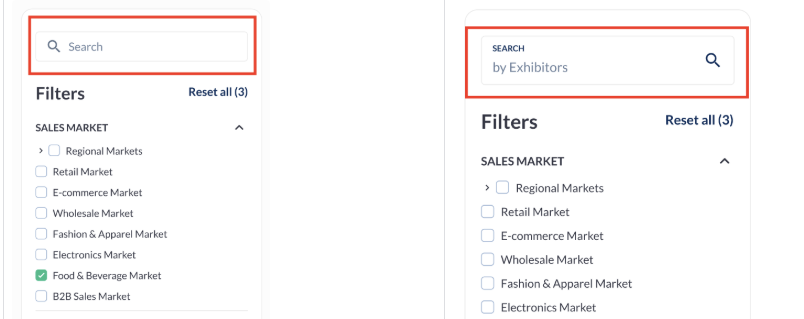
How it works on the front end:
-
The search field appears under the filter title.
-
It only appears when the filter contains ten or more items.
-
The placeholder text changes according to the page, for example: SEARCH by Exhibitors, SEARCH by Products, SEARCH by Brands, SEARCH by Delegates.
-
The search field supports all languages enabled by the organiser.
Important Points to Note:
-
Web only: this feature is currently available on the web only, with plans to extend it to the app later.
-
Where to set it up: this setting is on the Categories page, not on the Display Filters page. To show, hide, reorder or rename the filters themselves, see Managing the Display of your Filters.