Issues
If any of the following issues are occuring and there is a third-party cookie consent banner on the event website (CookieBot, CookieYes, OneTrust, Cookie Information, custom-built, etc.),the issue is likely due to misconfiguration.
-
Users get logged out unexpectedly / "Save" on Edit Profile fails (mobile app or web)
-
Exhibitor Manual unreachable for some exhibitors
-
reCAPTCHA expires before the user finishes registration
-
Notifications or live statistics stop updating mid-session
-
Random "user not identified" / authorization errors that disappear when the user clears cookies and re-logs in
Root cause
The customer's cookie consent tool classifies ExpoPlatform's auth token cookie and fingerprint cookie as non-Necessary (i.e. as Functional, Analytics, or Marketing). When the visitor rejects consent — or the tool sweeps cookies on page-load — these are deleted.
-
Without the auth token, the ExpoPlatform backend cannot identify the user → save/edit/login flows fail.
-
Without the fingerprint, the platform's WebSocket layer cannot bind the session → notifications, statistics, and other real-time features stop working.
Fix — customer-side configuration adjustments
The customer must move ExpoPlatform's cookies into the Necessary (or "Strictly Necessary" / "Essential") category in their consent tool's settings. These cookies are required for the platform to function; they are not analytics or marketing cookies and they are GDPR-permissible without consent.
Cookies that must be set as Necessary
|
Purpose |
Cookie name |
Notes |
|---|---|---|
|
Auth token (user identification) |
token |
Without this, every authenticated request fails. |
|
Fingerprint (sockets / notifications / statistics) |
fingerprint |
Without this, real-time features break silently. |
|
Any additional necessary cookies |
PHPSESSID |
e.g. PHPSESSID, session-related cookies if applicable. |
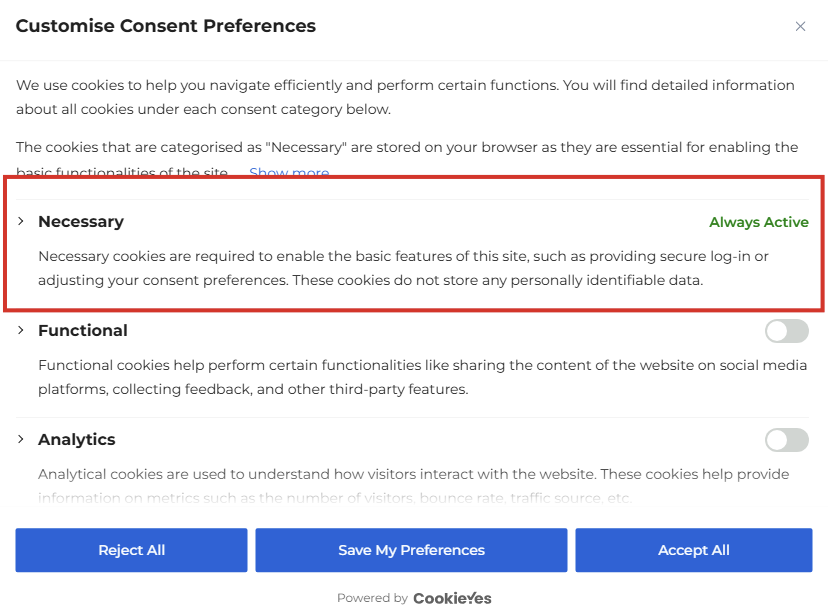
CookieYes — visual reference
The exact configuration looks like this in CookieYes (other tools have an equivalent "Necessary" / "Strictly Necessary" section):