
Feature Purpose:
The Meeting Availability filter helps users find people they can still book a meeting with. When the filter is applied on the front end, the list only shows users who have not yet reached the limit of confirmed meetings set for their user category.
Working with this Feature:
Navigate to Event Setup → “Display Filters” and turn on the Meeting Availability filter for the relevant directory tab. See Managing the Display of your Filters for how to show, hide, reorder and rename filters.
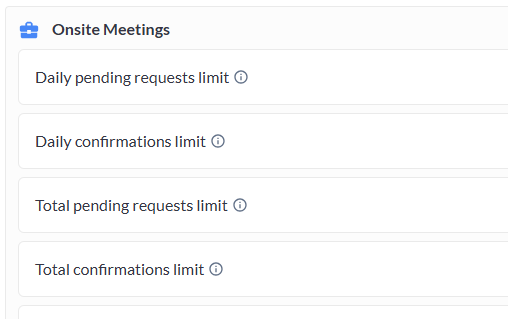
The meeting limits the filter checks are set under User Category (Participant and Exhibitor). Each category can have four confirmation limits:
-
Onsite, daily confirmations limit
-
Onsite, total confirmations limit
-
Online, daily confirmations limit
-
Online, total confirmations limit
How the filter decides who to show:
Both onsite and online confirmation limits are taken into account. A user is shown in the list as long as they can still accept a meeting in at least one format, meaning that for either onsite or online meetings, neither the daily nor the total limit has been reached.
The table below shows when a user will be visible with the Meeting Availability filter applied.
|
Onsite, Daily confirmations limit |
Onsite, Total confirmations limit |
Online, Daily confirmations limit |
Online, Total confirmations limit |
Result |
|---|---|---|---|---|
|
Reached |
Reached |
Reached |
Reached |
Not shown in the list |
|
Not reached |
Not reached |
Not reached |
Not reached |
Shown in the list |
|
Reached |
Reached |
Not reached |
Not reached |
Shown in the list |
|
Not reached |
Not reached |
Reached |
Reached |
Shown in the list |
|
Reached |
Not reached |
Reached |
Reached |
Not shown in the list |
|
Reached |
Reached |
Reached |
Not reached |
Not shown in the list |
|
Not reached |
Reached |
Not reached |
Reached |
Not shown in the list |
|
Not reached |
Reached |
Reached |
Reached |
Not shown in the list |
|
Reached |
Reached |
Not reached |
Reached |
Not shown in the list |
Important Points to Note:
-
Web only: the Meeting Availability filter is available on the web and not in the app. Changes to this filter apply to the web only.
-
Team members: team members inherit their meeting limits from the limit set for their exhibitor.
-
Combining with other filters: like any other filter, Meeting Availability is combined with other active filters using “and” logic, so results must match all selected filters.