
Tracks as Part of Session Content Filters
In addition to Tags and Types, Tracks can now also be included as a filter for sessions
-
New admin setting under Management > Sessions > Configuration allows the Organizer to turn this option on or off
-
As with other filters, visibility can be controlled under Event Set up > Display Filters > Sessions
-
When toggled on, the list of gray tracks tags across the top will be hidden. When toggled off, these gray tags will still appear
-
Tracks has a fixed position in the filter list and it cannot be reordered
-
Applies to both scheduled sessions and on-demand sessions
-
Default is off
|
|
|
Benefits:
-
Additional flexibility for organizers
-
Easier for users to find the sessions they’re interested in
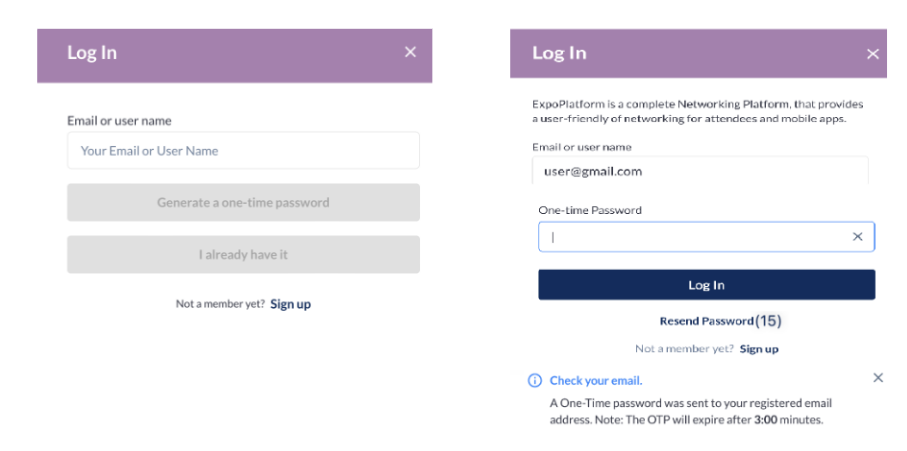
Passwordless Logination
A new option to provide participants with a one time password instead.
-
If a user is not yet registered, when they enter their email then click on Generate a one-time password, they will receive a message saying ““Incorrect login and/or password“
-
If the user is registered, then the will be taken to a screen where they can enter the one-time password that was emailed to them.
-
If the email was not received, after 15 seconds they can generate a new email with a new OTP
-
The screen to enter the OTP password can also be reached by clicking on I already have it
-
OTPs are valid for 3 minutes
-
Benefits:
-
The risk of an account being compromised is drastically reduced, if not eliminated
-
Since it is randomly generated, the user does not have to make an effort to remember it.