
Overview
Organisers have the option of enabling AI-powered search which users can then use to find exhibitors of interest by entering a natural language prompt.
Currently AI-powered search is only available for web and not for mobile app.
Admin Setup
-
Admins can access the “AI Search” tab in the admin panel under Networking & Matchmaking > Search AI
-
On this tab, the text that appears in the AI widget's input field can be configured, with a limit of 100 characters
-
On this same page up to 3 suggested prompts cab be entered as well.
Search Details
-
Search Mode Exclusivity:
-
The platform does not support simultaneous use of AI search and Elastic Search. Users must select one option at a time.
-
-
Search Interaction:
-
After initiating a search and receiving initial results, users can input additional messages in the widget to refine or expand their query.
-
-
Results Management:
-
Various display options are available for search results, including icons, lists, or custom listings (if the respective setting is enabled in the admin panel).
-
-
Sequential Result Display:
-
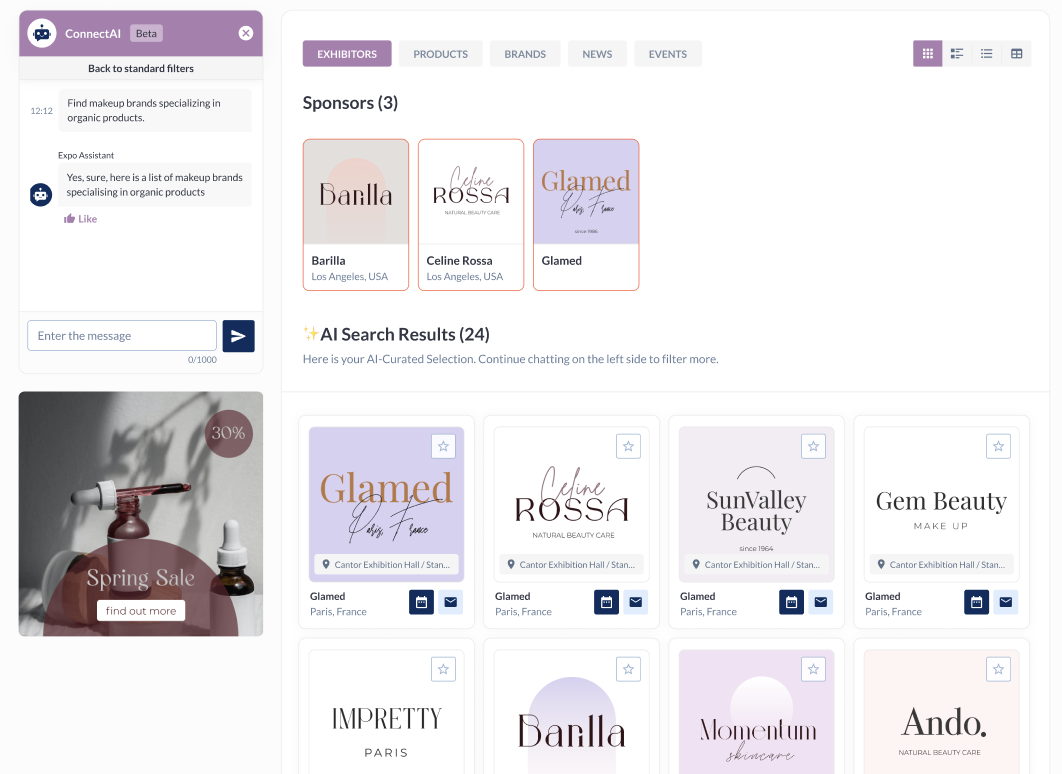
Upon launching a prompt, the widget responds first, indicating that results are being prepared (e.g., "Here is the list of exhibitors with certified products"). Subsequently, the list of relevant exhibitors is displayed.
-
This ensures that users see a confirmation message before the actual results, enhancing the user experience.
-
-
Unified Display Across Sections:
-
Results for both sponsors and exhibitors are displayed simultaneously in their respective sections when a prompt is made.
-
For instance, searching for "certified products" will show sponsors with certified products in the sponsors section and exhibitors in the exhibitors section. Note that sponsors may appear in both sections.
-
-
Refining Search Results:
-
Users can refine displayed search results by entering additional prompts. For example, after viewing exhibitors with certified products, a user might specify, "Show the list of exhibitors with certified products from the USA," to filter results geographically.
-
-
Result Limitations:
-
The system will display no more than 500 results per prompt to maintain performance and usability.
-
-
Chat Persistence:
-
The chat history with AI is not saved. If a user exits and later reopens the widget, there are no previous messages sent to AI in this chat.
-
-
Handling Page Refreshes:
-
If a user refreshes the page while a prompt is being processed, the prompt will stop processing. Upon reload, the widget will display with the last message entered but without continuing the previous search process.
-
-
Interaction During Search:
-
While results are being generated (indicated by an animation in the widget), it is not possible to input new prompts. Meaning the user can type something in the input field but won’t be able to send it in the chat while there is a prompt in progress.
-
A stop button is available next to the animation, allowing users to cancel the ongoing search to input a new prompt.
-
-
Algorithm Independence:
-
The search results are not influenced by the matchmaking algorithm, ensuring that results are generated based solely on the query parameters set by the user.
-
-
Language Limitation
-
The AI search is currently limited to the English language
-
-
Error Handling:
-
The system includes error messages for timeout and internal errors, ensuring users are informed of any issues during the search process.
-
End-user Experience
-
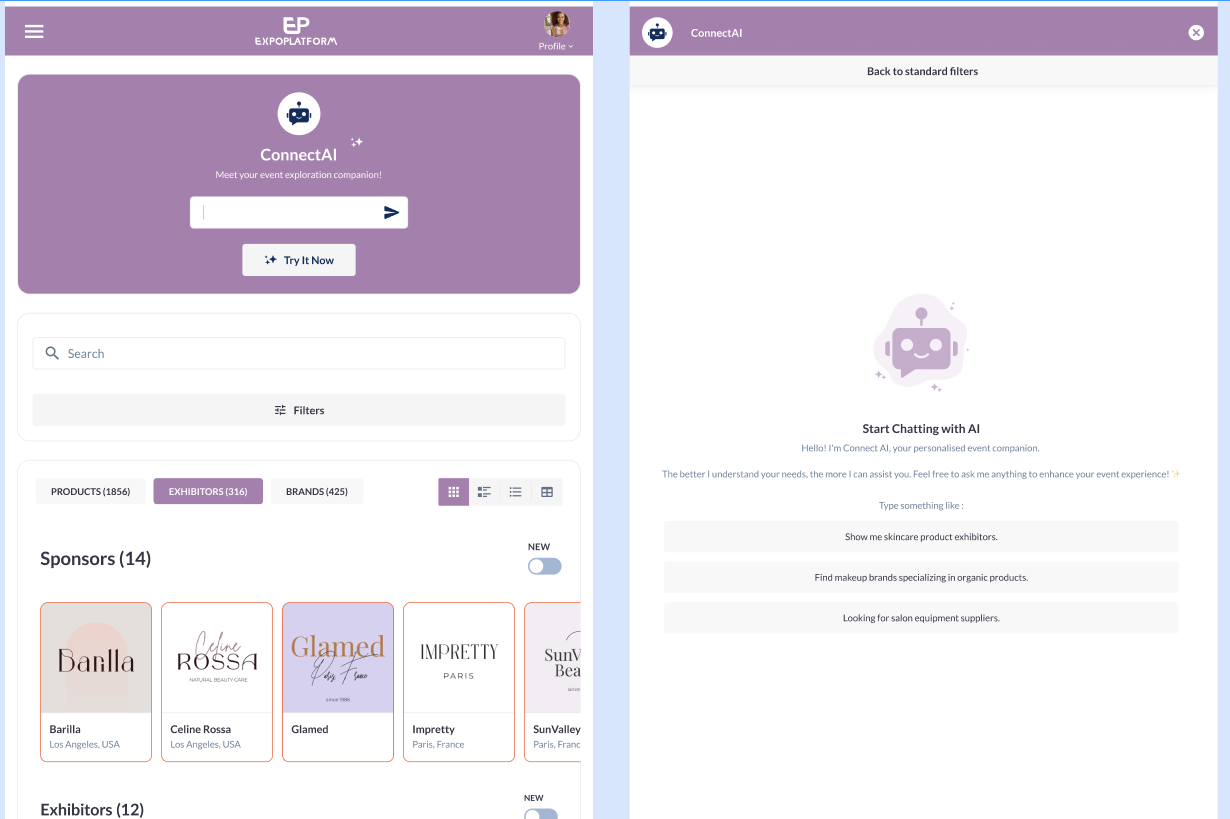
Activation and Usage: Users can activate the AI search by clicking the 'Try It Now' button or the arrow in the input field. This expands a widget that occupies 70% of the page height, providing a dedicated space for AI interactions.
-
Interface Changes: When the AI widget is active:
-
All filters are hidden once the pop-up is expanded.
-
Banners and product finder widget located under the filters remain visible and unchanged.
-
All tabs, except for the "Exhibitors" tab, are disabled.
-
-
Pagination support
-
AI search results are paginated. Users can browse beyond the first page of results without repeating the full search.
-
Implementation is stateless — there is no server-side result caching between page requests. This means that if event data changes between page requests, there may be minor inconsistencies (duplicate or missing items). This is an accepted trade-off for the initial release; Redis-based result caching is planned for a future phase.
-
Technical parameters (for organiser/TAM awareness if integrating via API): the search API accepts
offset(integer, default 0) andframe_size(integer, required) to control which slice of results is returned.
-
-
Filter support / Allowed-ID post-filtering
-
When users apply filters on the marketplace (e.g. by category, country, session type), AI search results respect those filters. The backend resolves active filters into a list of entity IDs and constrains the Qdrant vector ranking to that set.
-
Approximately 40 filter types are supported across: Exhibitors, Products, Sessions, Delegates, Speakers, News, and Exhibitor Events.
-
When no filters are active, AI search behaviour is unchanged (no regression).
-
-
Pavilions in AI Search
-
As of July 2026, Pavilions are indexed as a distinct, searchable entity type in AI Search, alongside regular exhibitors.
What a Pavilion is: A Pavilion is an exhibitor record marked as a parent via the "is Pavilion" toggle in the admin panel. Pavilions typically represent physically prominent structures at in-person events and may have child exhibitors grouped beneath them.
What changed:
-
Pavilion records are indexed separately from regular exhibitors, so attendees can search for a pavilion by name or hall identifier and receive a dedicated result rather than a generic exhibitor entry.
-
Search results display a dedicated Pavilions section on the unified search results page, consistent with how other entity types are presented.
-
Pavilion results receive an appropriate relevance boost when the query semantically matches a pavilion name, ensuring they appear prominently in the Top Results strip.
-
The parent–child relationship is captured in the index: searching for a pavilion may surface the pavilion itself and optionally hint at the child exhibitors grouped under it.
-
When no pavilion matches the query, the Pavilions section is not rendered — no empty section is shown to the user.
-
Backward compatibility: Existing exhibitor search behaviour is unchanged for non-pavilion exhibitors.
-
Admin note: No admin configuration is required to enable Pavilion indexing. Pavilion records are indexed automatically when the "is Pavilion" flag is set on an exhibitor record.
-
-
-
On-Demand Sessions in AI Search
-
On-Demand Sessions are now indexed in the AI-powered Search pipeline, enabling attendees to find session recordings via the unified search results page.
-
Key behaviours
-
On-Demand Sessions appear in a named section on the unified search results page, distinct from live Sessions.
-
Relevance ranking follows: title > speaker > description/topic.
-
Speaker-aware matching is supported — searching by speaker name surfaces their sessions.
-
There is no hard relevance cutoff; the system always returns best-effort results
-
-
-
Community Groups in AI Search
-
As of July 2026 (Release 5, live 29 Jul), Community Groups are indexed as a distinct, searchable entity type in AI Search.
-
Community Groups are social-network-style groups within the platform that attendees can join and discover based on shared interests or topics.
-
Community Group records (group name and description) are indexed in the AI Search pipeline as a distinct entity type.
-
Semantic, intent-based matching is supported — for example, a query for "sustainability networking" can surface relevant groups even without an exact name match.
-
Relevance ranking: name match > description match.
-
Groups appear as a named Groups section on the unified search results page.
-
When no groups match the query, the Groups section is not rendered — no empty section is shown to the user.
-
Events with 0 Community Groups will not surface group results, by design
-
-