
Feature Purpose:
This feature allows users to bookmark stands on the ExpoFP floor plan, enabling them to easily revisit stands of interest without having to search again. This is particularly useful for large expos where users may want to track multiple exhibitors.
Please note: Currently this feature is implemented for the mobile app only, with plans to add web support in the future. Favourites synching is also planned for the future.
Working with this Feature:
-
Users can bookmark various types of stands including standard exhibitor stands, sessions, events, and custom locations.
-
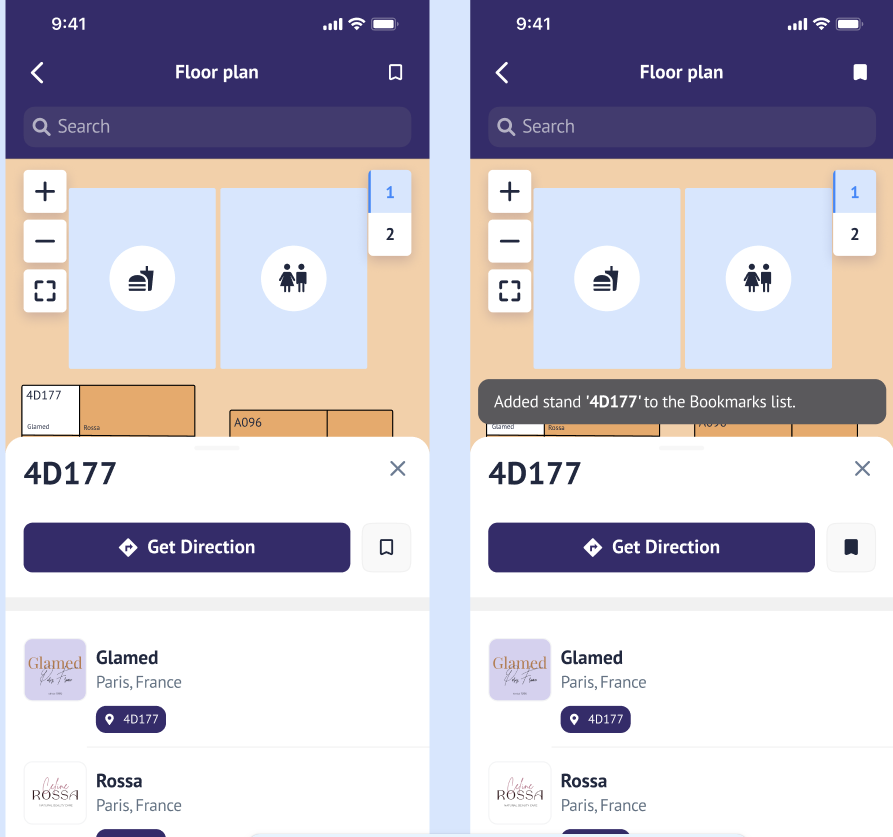
A bookmark button adds the stand to a persistent list, with a notification confirming the action.
-
The bookmark icon updates to a filled state when a stand is bookmarked.
-
Users can navigate to the Bookmarks page via the bookmark icon, where all bookmarked stands are displayed and sorted alphanumerically and can be searched by stand name or exhibitor name.
-
Bookmarked stands can be expanded to show child exhibitors and can be removed by clicking the X icon.
Important Points to Know:
-
The feature is currently implemented for the mobile app only, with plans for multi-platform support in the future.
-
Data about bookmarks is stored localy in the app database and is avaliable for all users (logged and non logged) that use that current device. Data can be deleted or manually by the user and will be deleted automaically upon app reinstall.
-
Multilanguage support is provided for various labels and notifications in French, German, Spanish and Italian.