
Feature overview
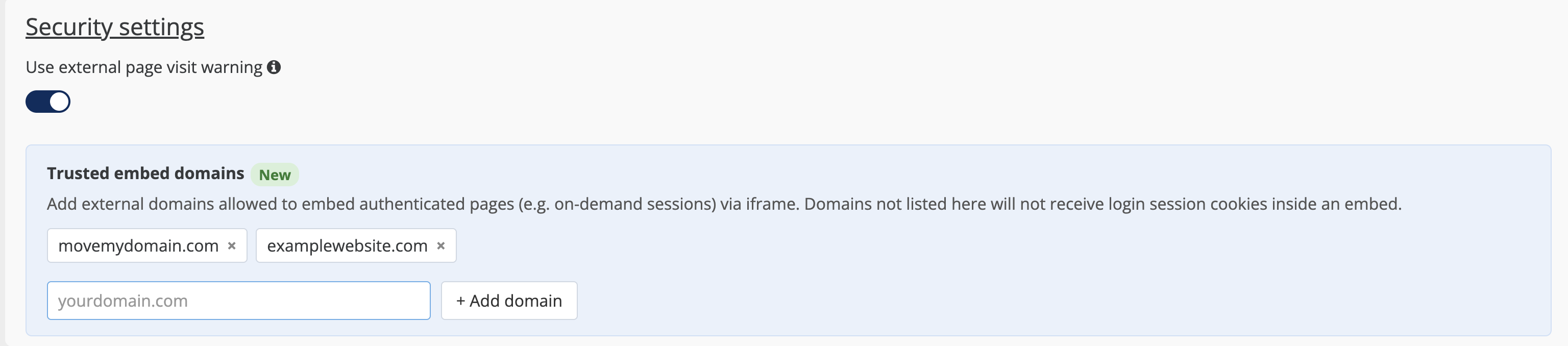
Organizers can now define a list of Trusted Embed Domains — external domains permitted to embed authenticated ExpoPlatform pages (such as On-Demand Sessions) via iframe. This enables secure cross-domain embedding while enforcing browser cookie policy only for whitelisted origins.
Navigation
Event Setup >> General >> Settings >> Security settings
Working with this Feature
Overview
Trusted Embed Domains allow you to specify external websites that are permitted to display authenticated ExpoPlatform content within an iframe. Only domains on this list can embed pages that require login, such as On-Demand Sessions.
Adding trusted domains
-
Go to Event Setup >> General >> Settings.
-
Scroll to the Security settings section.
-
In the Trusted Embed Domains field, enter an external domain URL.
-
Press Enter or click Add — the domain appears as a removable chip.
-
Repeat for additional domains, then save your settings.
Removing trusted domains
Click the × on any domain chip to remove it, then save.
Validation
If an invalid URL format is entered, an error message is displayed and the domain is not added.
UI helper text (verbatim)
"Add external domains allowed to embed authenticated pages (e.g. on-demand sessions) via iframe."