
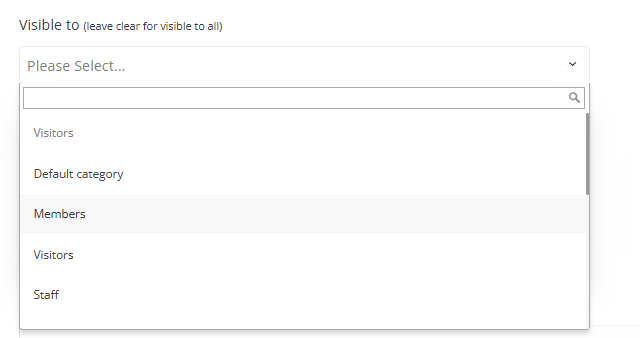
On the session creation page, there is a “Visible to” field where the admin can control which categories or roles of participants will be able to see the session in lists, speaker profiles, moderator profiles, etc.
-
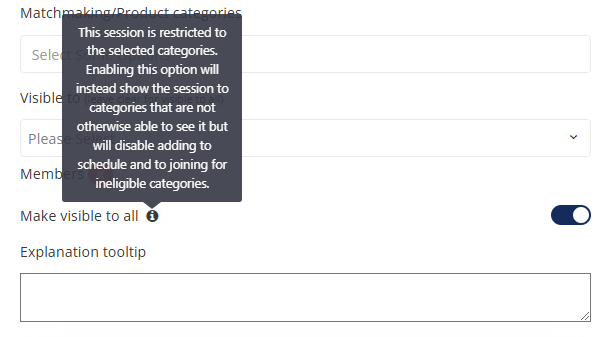
When the admin selects specific restrictions in this field, a “Make visible to all” toggle will appear.
-
If “Make visible to all” is turned ON, all users will be able to see the session. However, only the categories or roles specified in the “Visible to” field will be able to interact with the session (e.g., add it to their schedule). If desired, an explanatory tooltip can be added for those users who are unable to interact with the session. (For example, this session is only open to Members).
Important Note
The visibility restrictions do not apply to session speakers or moderators—they will always be able to access and view the session, regardless of the settings in the “Visible to” field.
Troubleshooting
Visitor added via API but session missing from their schedule
-
Problem: A visitor is added to a session via the
sessions/addVisitorAPI endpoint, the call returns success, but the session does not appear in the visitor's schedule/calendar. -
Cause: Two settings can silently block this, independent of the API call succeeding:
-
The session's "Visible to" field (see above) is restricted to specific categories, and the visitor's category isn't included.
-
The session is not marked Active.
-
-
Fix: Check both in the session's settings:
-
Confirm the session is Active.
-
Confirm "Visible to" either includes the visitor's category, or "Make visible to all" is enabled.
-
-
Prevention: Before enrolling visitors via the
addVisitorAPI, verify target sessions are Active and that "Visible to" covers the categories you intend to enroll.