
Feature Purpose:
This feature restricts exhibitors who do not have team members from interacting with other users, ensuring that only well-represented exhibitors can engage with the audience.
Working with this Feature:
Enabling the Setting:
-
Location:
-
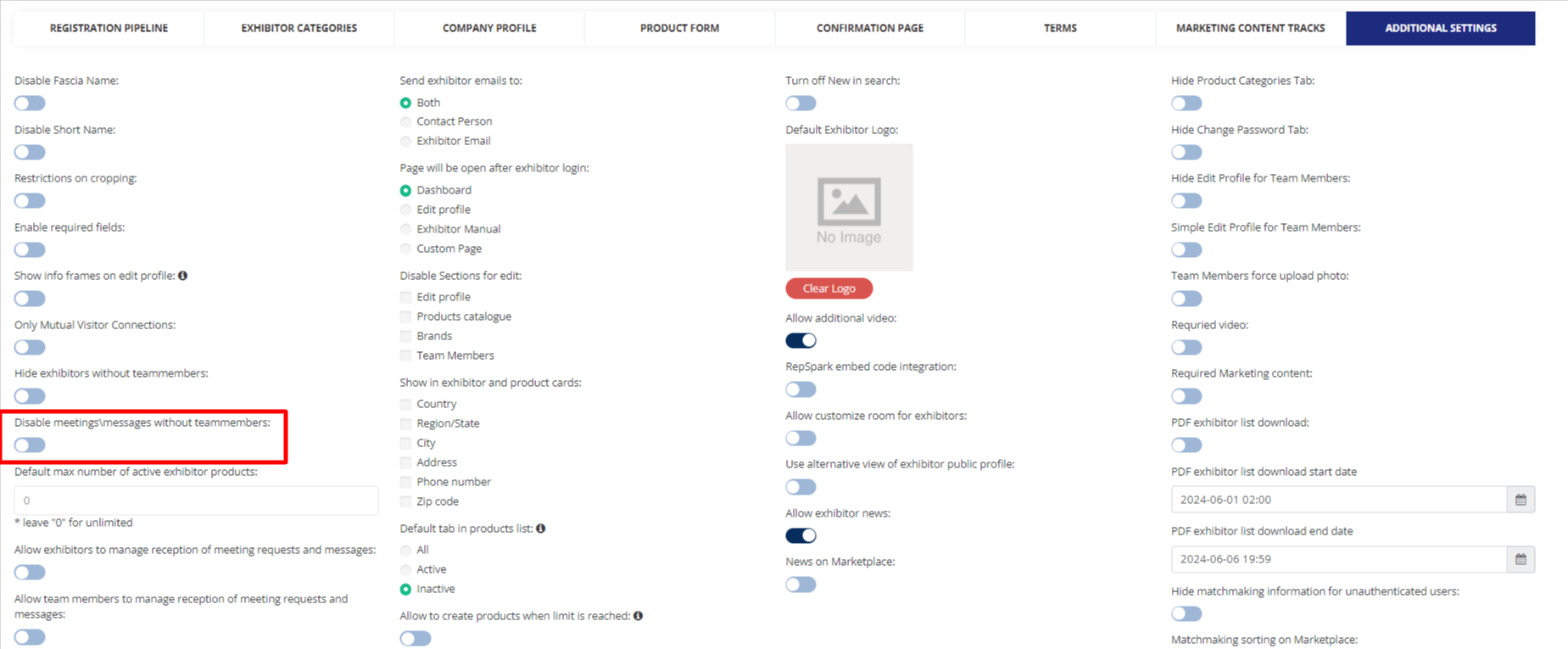
The setting can be found in the admin panel at
Registration Setting>>Exhibitor>>Additional Setting
-
-
Functionality:
-
When this setting is turned on, exhibitors without team members are restricted from initiating or engaging in interactions with other users.
-
The exhibitor won’t be able to send any message or request for any meetings, and will not be able to receive meeting requests and messages
-
This restriction ensures that only exhibitors with team members can fully participate in networking and engagement activities.
-
Interaction Rules:
-
Existing Meetings and Chats:
-
Exhibitors without team members who already have ongoing meetings or chats can still interact with the users involved in those existing engagements.
-
This allows for the continuation of pre-scheduled interactions without disruption.
-
Troubleshooting:
-
Setting Activation:
-
Ensure that the setting is properly enabled in the admin panel.
-
Verify that the restriction is correctly applied by checking the interaction capabilities of exhibitors without team members. You can test either by impersonating the profile or creating a test exhibitor.
-
-
Interaction Issues:
-
Confirm that exhibitors with team members can interact freely with other users.
-
Ensure that existing meetings and chats for exhibitors without team members are not disrupted and that interactions within these engagements are still possible.
-
-
User Notifications:
-
Provide clear communication about the requirements for team members to facilitate interactions.
-