
Overview:
Each registration question has a series of checkboxes at the top that can be checked to indicate how registration answers to this particular question should be displayed or used.
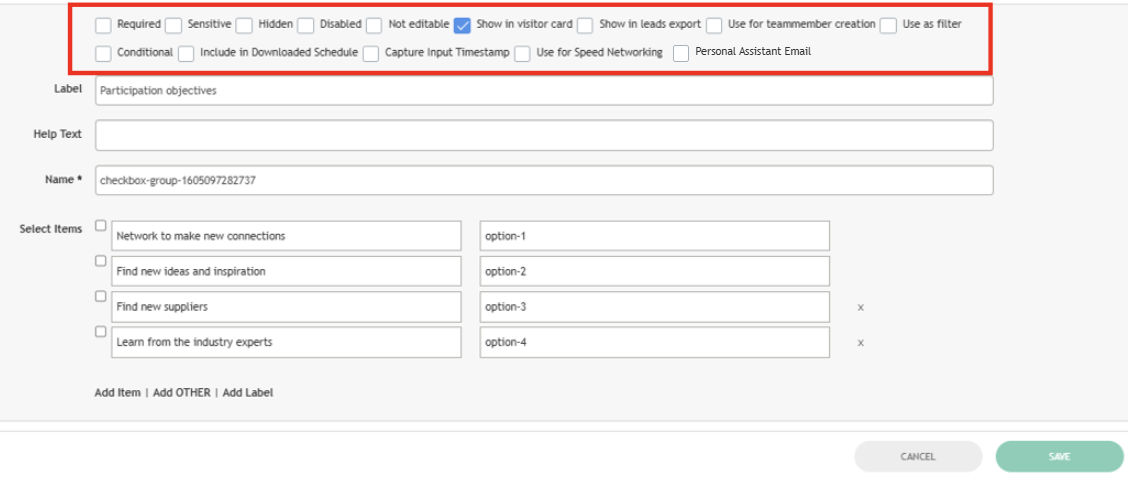
Details about each option:
Use for Team Member Creation
-
When checked, this field appears on the frontend and in the admin panel in the Team Member add/edit pop-up.
Hidden
-
Hides a field in the profile edit on the frontend and in the registration form by adding a “hidden” html-attribute. Field remains visible in the admin panel edit user
Show in Visitor Card
-
When checked, the label and value of the field display in the visitor profile in the Matchmaking Information block.
Required
-
Adds black-coloured “*” sign near the field label to indicate that the field is required.
-
To force users to fill required fields in, you also need to turn on “Enable required fields” toggle in the admin panel at /admin/registration/settings.
Show in leads report
-
When checked, data entered in this field displays in the leads export file in a column named the same as the field label.
Senstive
-
If checked, this field can be cleared for all visitors by pressing “Delete All Sensitive Data” in the admin panel at /admin/data/gdpr.
Disabled
-
Disables a field on the registration form by adding a “hidden” html-attribute and in the Edit Profile profile on the frontend. Field remains enabled in the admin panel user edit
Help Text
-
When filled in, this text will be used in a tooltip that appears near the field
Not Editable
-
Enables “read only” mode for the field in the Edit Profile on the frontend and in the registration form by adding a “hidden” html-attribute. Field remains editable in the admin panel user edit.
Placeholder
-
The entered data will be displayed in an empty field as a placeholder.
Use for speed networking
-
Fields with the checked “Use for Speed Networking“ checkbox checked are transmited to the Opt-in speed networking session settings page, under the “Conditions“.step
Personal Assistant Email
-
All emails sent to Participants (including Buyers and Team Members) will cc the email address in this field